Skip to content
MirageCHATEngagePublishGrow
Compare

MirageCHAT vs respond.io

respond.io is a customer conversation platform for larger B2C teams, with many channels and advanced workflows. MirageCHAT gives smaller teams the shared inbox, AI and publishing at a fraction of the price.

14-day free trial · No credit card required

Facts checked 27 September 2026

252 features, side by side

One feature per row. Ours from our product guides; theirs from each company’s own plan table.

MirageCHAT

197

of 252 features

respond.io

95

of 252 features

The short answer

MirageCHAT

Choose MirageCHAT if…

Choose MirageCHAT if your team answers clients on WhatsApp, Instagram, Messenger, Telegram and your website, and you want AI replies included from the first plan, publishing and Insights, from $19.99 a month.

Start your free 14-day trial
respond.io

Choose respond.io if…

Choose respond.io if you need LINE, Viber, WeChat or email next to WhatsApp, advanced workflow automation with webhooks, SSO and multiple workspaces — and the budget for it.

Feature by feature

Jump to a category, or read it all.

on every paid planBusiness from that plan upSoon coming soon— not listed on that company’s pricing page — not «cannot be done»

Plans and price

US prices with monthly billing, as each pricing page showed them.

FeatureMirageCHATrespond.io
Starting priceFree; paid from $19.99$79 a month
Top plan before custom pricing$59.99 — Pro, then $1.75 an account past 25$279 — Advanced
What makes the bill growConnected accounts past your package, and AI replies past itActive contacts
A fee for each extra contactNoneA higher contact tier
Channels on the first paid plan5 connected accountsAll channels
Team members on the first paid planUnlimited5
The most team membersUnlimited on every paid planUnlimited on Enterprise
AI in the price100, 500 or 1,000 AI replies a month on the paid plans; your own key or Gemini Free uses none5,000 to 40,000 AI credits
Free trial14 days of Pro, no card; then Free7 days, no card
Free planYes — 2 accounts, the inbox and Instant PostNo
WhatsApp feesMeta’s rates, no markupBilled by Meta

Channels

Where your clients can write to you.

MirageCHAT 7 · respond.io 11

FeatureMirageCHATrespond.io
WhatsAppIncludedIncluded
Instagram direct messagesIncludedIncluded
Facebook MessengerIncludedIncluded
TelegramIncludedIncluded
Website chatIncludedIncluded
TikTok messagesSoonIncluded
SMSIncludedIncluded
Email as a channelNot listedIncluded
LINE, Viber and WeChatNot listedIncluded
Voice callsIncludedIncluded
A custom channel of your ownNot listedFrom Advanced

Shared inbox

Where the team answers.

MirageCHAT 16 · respond.io 16

FeatureMirageCHATrespond.io
One inbox for every connected channelIncludedIncluded
Views: open, unanswered, snoozed, locked, by channelIncludedIncluded
Assign a conversation to a teammateIncludedIncluded
Snooze a conversationIncludedIncluded
A reminder to follow upIncludedNot listed
A message scheduled for laterIncludedNot listed
Quick replies in one tapIncludedIncluded
AI drafts you read, edit and sendIncludedIncluded
Translate a client’s messageIncludedIncluded
Reply in your own languageIncludedIncluded
Voice notesIncludedIncluded
Photos and filesIncludedIncluded
LocationsIncludedNot listed
Mark important clientsIncludedNot listed
Lock a private conversation behind a PINIncludedNot listed
Export conversations to CSVIncludedIncluded
Labels that sort conversations by your rulesNot listedNot listed
AI rewrites tone and spellingNot listedIncluded
AI summary of a conversationNot listedIncluded
Invite a colleague into a conversationNot listedIncluded
Typing indicatorNot listedIncluded
Block a contactNot listedIncluded

Comments

Instagram, Facebook and TikTok comments next to your messages.

MirageCHAT 13 · respond.io 0

FeatureMirageCHATrespond.io
Instagram comments in one listIncludedNot listed
Facebook Page comments in the same listIncludedNot listed
TikTok comments in the same listIncludedNot listed
YouTube comments in the same listIncludedNot listed
Google reviews in the same list, with your reply posted on GoogleSoonNot listed
Reply to a comment in publicIncludedNot listed
Reply to a comment in privateIncludedNot listed
Hide or unhide a commentIncludedNot listed
Delete a commentIncludedNot listed
The post shown next to its commentsIncludedNot listed
An automatic DM to everyone who comments on InstagramIncludedNot listed
An automatic reply under each commentInstagram, Facebook, TikTokNot listed
Hide comments automatically, by wordInstagram, Facebook, TikTokNot listed
Comment → DM on Facebook Page commentsIncludedNot listed
AI replies to positive commentsNot listedNot listed

AI assistant

Answers clients from your own information.

MirageCHAT 11 · respond.io 10

FeatureMirageCHATrespond.io
AI in the plan priceIncludedIncluded
The AI replies by itselfIncludedFrom Growth
The AI suggests, a person sendsIncludedIncluded
Off, suggest or reply — chosen per channelIncludedNot listed
Answers in the client’s languageIncludedFrom Growth
Your rules: how it sounds and what it must never sayIncludedFrom Growth
Try it yourself before clients see itIncludedNot listed
A to-do list of the questions it could not answerIncludedNot listed
Hands the client to a person when it does not knowIncludedFrom Growth
Pause it in one tapIncludedNot listed
Choose the AI quality and a monthly limitIncludedNot listed
Google reviews: AI drafts a reply; 4–5★ reviews answered automatically only if you allow itSoonNot listed
Starts a conversation by intent, not only keywordsNot listedNot listed
Understands images, files and voice notesNot listedFrom Growth
Ready-made agents: receptionist, support, salesNot listedFrom Growth
Takes actions: tags, closes, updates the client recordNot listedFrom Growth
Goals: clicks, follows or leadsNot listedNot listed
Knows which ad the client came fromNot listedFrom Growth

What the AI knows

The libraries every answer comes from.

MirageCHAT 8 · respond.io 3

FeatureMirageCHATrespond.io
Reads your website — every page and languageIncludedFrom Growth
Your notes and highlightsIncludedFrom Growth
Your filesIncludedFrom Growth
Sends photos of the place asked about — up to 5IncludedNot listed
Learns from your team’s conversationsIncludedNot listed
Every answer shows the source it came fromIncludedNot listed
Test a question and see which source answeredIncludedNot listed
Read your website again, nowIncludedNot listed

Automations

When? What does it do? Where should it run?

MirageCHAT 27 · respond.io 12

FeatureMirageCHATrespond.io
When a new customer writesIncludedNot listed
When you are closed — away repliesIncludedNot listed
When a message contains a wordIncludedNot listed
When nobody replied in timeIncludedNot listed
When someone comments on a post — by word and by postInstagram, Facebook, TikTokNot listed
Reply automaticallyIncludedFrom Growth
Tag the clientIncludedFrom Growth
Change the conversation’s statusIncludedFrom Growth
Email meIncludedNot listed
Mark the client as VIPIncludedNot listed
Choose the channels it runs on: WhatsApp, Instagram, Messenger, TelegramIncludedNot listed
Two ways to build: a short form, or a visual canvasIncludedNot listed
Several steps in one automationIncludedFrom Growth
Wait — up to 7 daysIncludedNot listed
Let the AI answer as a stepIncludedFrom Growth
Only if… conditions, with an Otherwise pathIncludedFrom Growth
Buttons the customer taps, each with its own pathIncludedFrom Growth
Hand the client to a teammateIncludedFrom Growth
Follow up when a client goes quietIncludedFrom Growth
Stops by itself when the client writes, a teammate takes over or the chat closesIncludedNot listed
Keeps to WhatsApp’s 24-hour rule by itselfIncludedNot listed
At most once an hour or once a day per clientIncludedNot listed
Collect emails and phone numbers in the chatWebsite chatNot listed
A drag-and-drop flow builderIncludedFrom Growth
Ready-made automation templatesIncludedFrom Growth
A/B test two messagesIncludedNot listed
Call your own systems from a flowNot listedFrom Advanced
WhatsApp formsIncludedNot listed

Growth tools for social and ads

Conversations started from stories, follows, links and ads.

MirageCHAT 2 · respond.io 3

FeatureMirageCHATrespond.io
Reply to story replies and reactionsNot listedNot listed
Reply when you are mentioned in a storyNot listedNot listed
Welcome new followers with a DMNot listedNot listed
A DM from Instagram Live commentsNot listedNot listed
Conversation startersNot listedNot listed
Links, QR codes and website buttons that open a chatWhatsApp QR and website chatIncluded
Check whether someone follows youNot listedNot listed
Chats started from Meta adsIncludedIncluded
Send ad conversions back to MetaNot listedFrom Growth

TikTok

Publishing, comments and Insights today; messages and auto-replies come next.

MirageCHAT 3 · respond.io 2

FeatureMirageCHATrespond.io
TikTok comments: reply, hide, like — and delete your ownIncludedNot listed
New TikTok comments arrive by themselvesIncludedNot listed
TikTok comment automations: reply, like or hide, by word and by videoIncludedNot listed
TikTok auto-replies from your AISoonNot listed
TikTok welcome message and suggested questionsSoonNot listed
TikTok keyword replies and flows with buttonsSoonNot listed
Save a client’s contact details from a TikTok chatSoonNot listed
TikTok chats opened from links and QR codesSoonNot listed
Chats started from TikTok adsSoonIncluded
Report a sale that began with a chat from your TikTok adSoonFrom Growth
TikTok photo posts, published directlySoonNot listed

Campaigns

Many clients at once, and series over days.

MirageCHAT 5 · respond.io 1

FeatureMirageCHATrespond.io
Send to a segment at onceIncludedFrom Growth
Ready-made campaign templatesIncludedNot listed
Sequences over daysAs automation stepsNot listed
WhatsApp templates with their approval statusIncludedNot listed
STOP and START handled automaticallyIncludedNot listed

Publishing

Instant Post and Social Studio.

MirageCHAT 21 · respond.io 0

FeatureMirageCHATrespond.io
Instagram postsIncludedNot listed
Instagram carouselsIncludedNot listed
Instagram StoriesIncludedNot listed
Instagram ReelsIncludedNot listed
Facebook Page postsIncludedNot listed
TikTok videosIncludedNot listed
TikTok settings: who can see it, comments, Duet and StitchIncludedNot listed
Send to your TikTok inbox to finish in the app — up to 35 photosIncludedNot listed
Photos go to TikTok as one videoIncludedNot listed
YouTube videos and ShortsIncludedNot listed
Google updates, events and offers, with a buttonSoonNot listed
A Post, a Story and a Reel from the same mediaIncludedNot listed
Publish now, or at a time you chooseIncludedNot listed
Several accounts at once, or a saved groupIncludedNot listed
Reel music: Instagram’s catalogue or your own audioIncludedNot listed
Hashtag setsIncludedNot listed
A result for every account; retry only the one that failedIncludedNot listed
Schedule up to a year ahead: quick picks and a calendarIncludedNot listed
Your posts: published, scheduled and failed, with filtersIncludedNot listed
A scheduled post: change its time, post it now or cancel itIncludedNot listed
A photo and video library, in collectionsIncludedNot listed
History with the reason for every failureIncludedNot listed

Social Insights

How your posts and profiles did.

MirageCHAT 9 · respond.io 0

FeatureMirageCHATrespond.io
Views, reactions, comments and clicks per postIncludedNot listed
Views, engagement, posts and followers over 7, 28 or 90 daysIncludedNot listed
Your best posts, with their picturesIncludedNot listed
Your best time to post, from your own postsIncludedNot listed
TikTok profile: followers, likes, videos and followingIncludedNot listed
Your recent TikTok videosIncludedNot listed
TikTok audience: the countries your viewers are inIncludedNot listed
Results for each TikTok videoIncludedNot listed
YouTube channel: views, watch time and subscribersIncludedNot listed
Google views on Search and Maps, calls, website clicks and directionsSoonNot listed
Automation and engagement insightsNot listedNot listed
Your top fans and followersNot listedNot listed

Clients (CRM)

A record built from the conversations themselves.

MirageCHAT 8 · respond.io 9

FeatureMirageCHATrespond.io
One record per client across channelsIncludedIncluded
Phone contacts from your WhatsApp Business appIncludedNot listed
TagsIncludedIncluded
Notes on a clientIncludedIncluded
The full conversation historyIncludedIncluded
SegmentsIncludedIncluded
Export clients to CSVIncludedIncluded
Custom contact fieldsNot listedIncluded
Lifecycle stagesNot listedIncluded
Import contactsIncludedIncluded

Team

Who sees what, and how the team is doing.

MirageCHAT 6 · respond.io 3

FeatureMirageCHATrespond.io
Each agent sees only the accounts they work onIncludedIncluded
Response time targetsIncludedNot listed
Announcements every agent seesIncludedNot listed
Audit: who is working and which rules were brokenIncludedNot listed
Permission to use Instant Post, per personIncludedNot listed
Workspace time zoneIncludedIncluded
Hide clients’ phone numbers from agentsNot listedFrom Advanced

Overview and analytics

Reply times your clients actually felt.

MirageCHAT 14 · respond.io 8

FeatureMirageCHATrespond.io
Clients waiting right nowIncludedIncluded
Today and this week at a glanceIncludedIncluded
Busiest hours of the weekIncludedNot listed
A live timeline of replies and AI answersIncludedNot listed
How fast the AI answered, over 7 daysIncludedNot listed
A setup checklist for new workspacesIncludedIncluded
Any period, compared with the one beforeIncludedNot listed
Filter by channel, business and topicIncludedIncluded
Who answered: which person, or the AIIncludedIncluded
Team response timesIncludedIncluded
Only real answers count — never an automatic messageIncludedNot listed
Waiting conversations and customersIncludedNot listed
Reports on conversations, messages and contactsIncludedIncluded
Export analytics to CSVIncludedNot listed
A sales leaderboardNot listedIncluded

Notifications

One page decides who hears what.

MirageCHAT 8 · respond.io 0

FeatureMirageCHATrespond.io
A client waitingIncludedNot listed
Something needs fixingIncludedNot listed
Words to watch for in a client’s messageIncludedNot listed
News about your teamIncludedNot listed
Numbers to watchIncludedNot listed
Daily and weekly summariesIncludedNot listed
Quiet hours for news that can waitIncludedNot listed
By email or in the appIncludedNot listed

Security and privacy

Each workspace separate, every important action logged.

MirageCHAT 9 · respond.io 4

FeatureMirageCHATrespond.io
An activity log: the team, the audit log and notifications sentIncludedNot listed
Audit records linked in a tamper-evident chainIncludedNot listed
Sign in with Google or AppleIncludedNot listed
Sign every device out at onceIncludedNot listed
Lock after repeated wrong passwordsIncludedNot listed
Data export and deletionIncludedIncluded
Two-factor sign-inIncludedIncluded
Channel keys encrypted with AES-256IncludedNot listed
Encrypted backups kept off-siteIncludedNot listed
Single sign-on (SSO)Not listedFrom Advanced
A virus scan of incoming filesNot listedIncluded

Website chat

Designed in Widget Studio, one line on your site.

MirageCHAT 5 · respond.io 1

FeatureMirageCHATrespond.io
AI answers from your own pagesIncludedFrom Growth
Widget Studio: your brand, launcher, welcome and hoursIncludedNot listed
A live preview while you design itIncludedNot listed
Questions before and after the chatIncludedNot listed
An email copy of the chatIncludedNot listed
A WhatsApp chat button for your websiteNot listedNot listed

WhatsApp

Your number, Meta’s rates.

MirageCHAT 4 · respond.io 2

FeatureMirageCHATrespond.io
Keep your number in the WhatsApp Business appIncludedNot listed
Your WhatsApp messaging limit, shownIncludedNot listed
WhatsApp costs with Meta’s own calculatorIncludedIncluded
No markup on Meta’s feesIncludedNot listed
A product catalog in WhatsAppNot listedIncluded

Integrations and API

Connect MirageCHAT to your own systems.

MirageCHAT 6 · respond.io 8

FeatureMirageCHATrespond.io
APIIncludedFrom Growth
Keys for one purpose — never a user’s passwordIncludedNot listed
Webhooks for real-time eventsIncludedFrom Advanced
An API manual inside your workspaceIncludedNot listed
Endpoints for WhatsApp, Instagram, Messenger, Telegram and the AIIncludedNot listed
Zapier, Make and n8nThrough the APIFrom Growth
Google SheetsNot listedFrom Growth
HubSpotNot listedFrom Growth
SalesforceNot listedFrom Advanced
Shopify and WooCommerceNot listedNot listed
Stripe and PayPalNot listedNot listed
Mailchimp, Klaviyo and ActiveCampaignNot listedNot listed
Calendly, Cal.com and Google CalendarNot listedFrom Growth
MCP for AI assistantsNot listedIncluded

Bookings, payments and billing

Inside the conversation, and on your own bill.

MirageCHAT 6 · respond.io 1

FeatureMirageCHATrespond.io
Your booking planner inside the chatIncludedNot listed
A payment request sent from a conversationIncludedNot listed
Your bank accounts for guest paymentsIncludedNot listed
A prepaid wallet in US dollarsIncludedNot listed
AI usage you can followIncludedIncluded
WhatsApp usage and costsIncludedNot listed

Phone apps

The App Store and Google Play.

MirageCHAT 9 · respond.io 1

FeatureMirageCHATrespond.io
iPhone and Android appsIncludedIncluded
iPadIncludedNot listed
The inbox with lock, translate, AI drafts and follow-upsIncludedNot listed
The AI assistant and its librariesIncludedNot listed
Instant Post on the phoneIncludedNot listed
Insights on the phone, TikTok includedIncludedNot listed
Notifications with Reply, Close and PendingIncludedNot listed
Recent conversations readable offlineIncludedNot listed
A PIN or Face ID lockIncludedNot listed

Their columns were read on 27 September 2026 from their own plan tables: respond.io pricing · respond.io channels. Ours come from the MirageCHAT product guides. Something changed? Write to info@miragechat.io and we will correct it.

Where respond.io is stronger

Said plainly, because it helps you choose.

More channels

LINE, Viber, WeChat and email sit next to WhatsApp, Instagram, Messenger, Telegram and SMS — and TikTok.

Advanced workflows

Workflow automation from Growth, with HTTP requests and webhooks on Advanced.

Enterprise controls

Single sign-on, multiple workspaces and masked phone numbers on higher plans.

Reviews

respond.io shows a 4.8 rating from 500+ reviews on G2.

Where MirageCHAT is stronger

About a quarter of the price

MirageCHAT's paid plans are $19.99, $39.99 and $59.99 a month, with every feature in each except WhatsApp calls, which are in Growth and Pro, and the Publishing API, which is in Pro; respond.io starts at $79.

AI on every paid plan

AI replies included from $19.99 — respond.io lists AI Agents from $159.

Automations on every paid plan

One-step automations, several-step follow-ups and the visual builder from $19.99; respond.io lists workflows from its Growth at $159.

Publishing and Insights

Instant Post to Instagram, Facebook and TikTok, now or scheduled up to a year ahead, plus every post you sent in one list and the numbers of each account.

AI from your own information

Replies drawn from your website, notes and photos, in the client’s language.

Guided setup

Connect WhatsApp, Instagram, Messenger and Telegram by signing in — no developer work.

Automations two ways

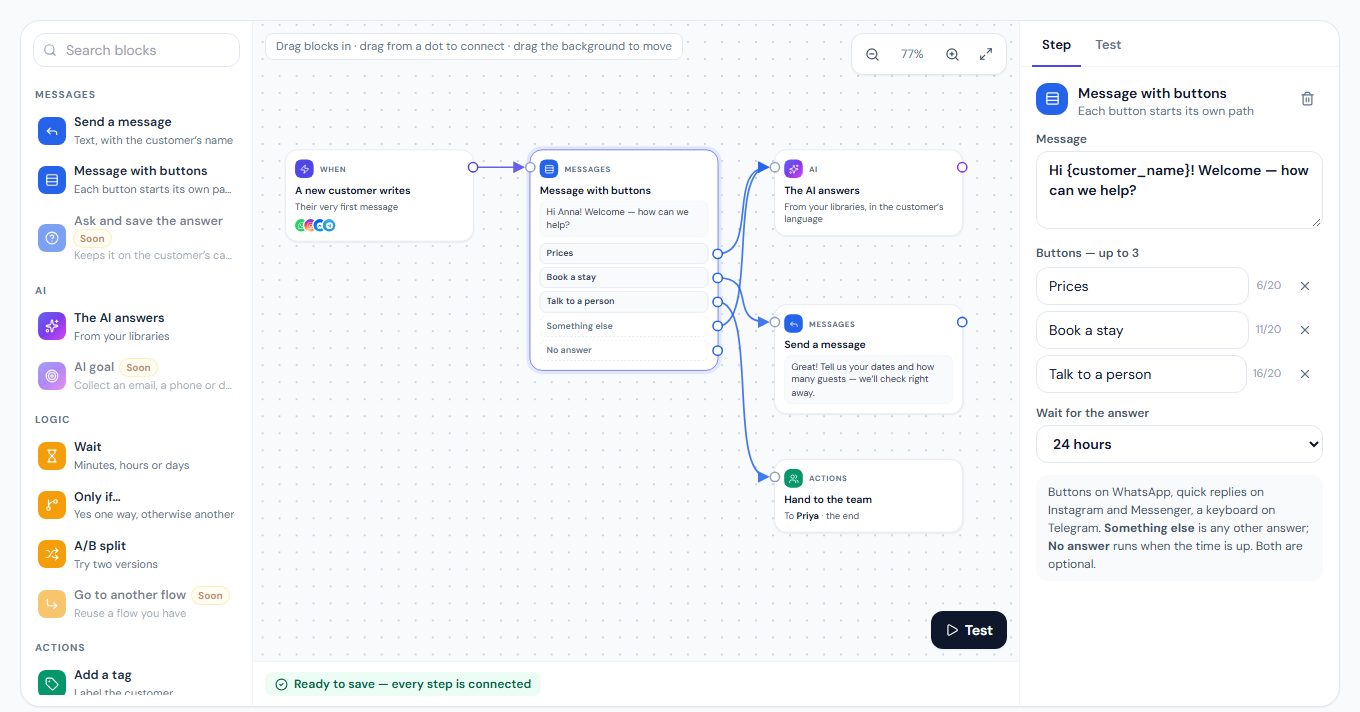
A short form for a one-step reply, or several steps and a visual builder with buttons, branches and an A/B split — both on every paid plan, both save the same automation.

Automations, two ways

A short form or a visual builder — both on every paid plan.

The MirageCHAT visual builder: a welcome message with three buttons, each connected to its own next step.
Build an automation in a short form, or draw it: buttons, «Otherwise» and an A/B split each get their own path. How it works

Moving to MirageCHAT

About an hour for a small team.

1

Start the free trial

14 days, every module, no credit card — then Free or a plan.

2

Connect your channels

Sign in with WhatsApp, Instagram, Messenger or Telegram and pick your accounts. You can keep your WhatsApp number on the Business app.

3

Teach the AI your business

Point it at your website, add notes and photos, and choose per channel: off, suggest or reply.

4

Rebuild your automations

Welcome, away, keywords and follow-ups in several steps — then invite your team.

Questions

Is MirageCHAT a respond.io alternative?
Yes, for small and mid-sized teams that answer clients on WhatsApp, Instagram, Messenger, Telegram and a website chat. If you need LINE, Viber, WeChat or enterprise controls such as SSO, respond.io covers them.
How do the prices compare?
MirageCHAT is free for 2 accounts, then $19.99, $39.99 or $59.99 a month, with every feature in every paid plan except WhatsApp calls, which are in Growth and Pro, and the Publishing API, which is in Pro. respond.io is $79, $159 or $279 a month with monthly billing, then Enterprise (checked 27 September 2026).
Are WhatsApp fees included?
In both, WhatsApp message fees are Meta’s. With MirageCHAT, Meta bills them per message to your own WhatsApp Business account, at its own rates, with no markup.
Does MirageCHAT have a workflow builder?
Yes, a visual builder on every paid plan, from $19.99 a month: buttons, «Otherwise», an A/B split, waits and AI answers — or a short form for simple replies. respond.io lists its Workflow Builder from Growth ($159 a month).
Does MirageCHAT have AI agents?
The AI assistant can suggest replies or answer by itself, per channel, from your website, notes and photos, and hands the client to a person when it does not know.

Other comparisons

MirageCHAT vs ManyChat

ManyChat is built around social automation for creators and brands. MirageCHAT is built around a shared team inbox for businesses that answer clients on several channels. Here is the honest difference.

Read the comparison — MirageCHAT vs ManyChat

MirageCHAT vs WhatChimp

WhatChimp is a WhatsApp marketing platform with broadcasts and store integrations. MirageCHAT is a multichannel team inbox with AI, a client CRM and publishing. Both pass Meta’s fees through with no markup.

Read the comparison — MirageCHAT vs WhatChimp

ManyChat, respond.io and WhatChimp are trademarks of their respective owners. MirageCHAT is not affiliated with them. Prices are US prices with monthly billing, as each company’s public page showed them on 27 September 2026; they may change.

Try MirageCHAT free for 14 days

No credit card is required, and then Free — 2 accounts, the inbox and Instant Post. Provider charges such as WhatsApp or SMS stay on your own provider account.

Start free trial