In short
When someone comments on your post, an automation can reply under the comment and send them one DM — the price, the link, the dates. You choose the words it listens for and the posts. The DM opens a conversation in your Inbox, where the AI and your team carry on.
1. Set it up
Start an automation
Go to
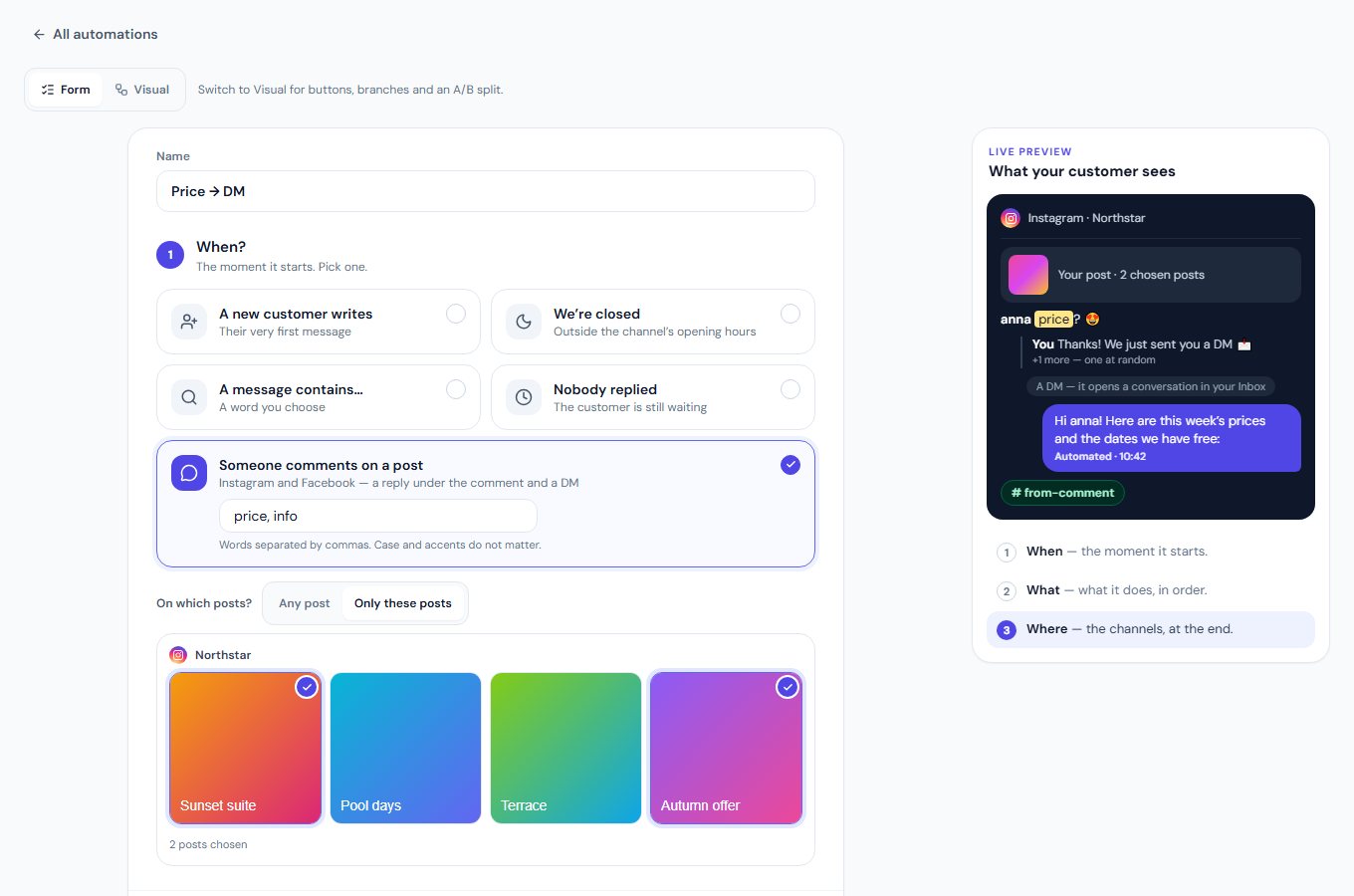
Automationand press New automation. Under When? pick Someone comments on a post, then the platforms beside On — Instagram, Facebook, TikTok, YouTube. All four listen until you switch one off.Choose the words
Type a word that starts it and press Enter or a comma — it becomes a chip; add more the same way, for example
price,info,link. Any one of them starts it, at the start of a word: price also answers “prices?”. Leave it empty to answer every comment. Case and accents do not matter.Choose the posts
Any post, or Only these posts and tap the posts in the grid.
Write the reply and the DM
Reply under the comment takes up to five lines — one is chosen at random for each comment, so your replies do not all look the same. Send a DM is the private message;
{customer_name}becomes their name. Hide the comment keeps spam out of sight, and Like the comment adds a like from your account — on TikTok, on a Facebook Page and on an Instagram account connected through its Facebook Page. A DM after a comment exists on Instagram and Facebook only: with TikTok or YouTube alone the suggested reply thanks the person and promises no DM, and a line that mentions one is flagged. A step none of your platforms has is not saved — the page says why.Pick the accounts, then save
Under Where should it run? only the accounts of those platforms are listed: choose All or Only some, then press Save automation. Without a name it is named for you — for example «Instagram comment · Zen Villa». It runs from that moment, and the list shows its channels, how many times it ran and when it last did.
2. Or draw it
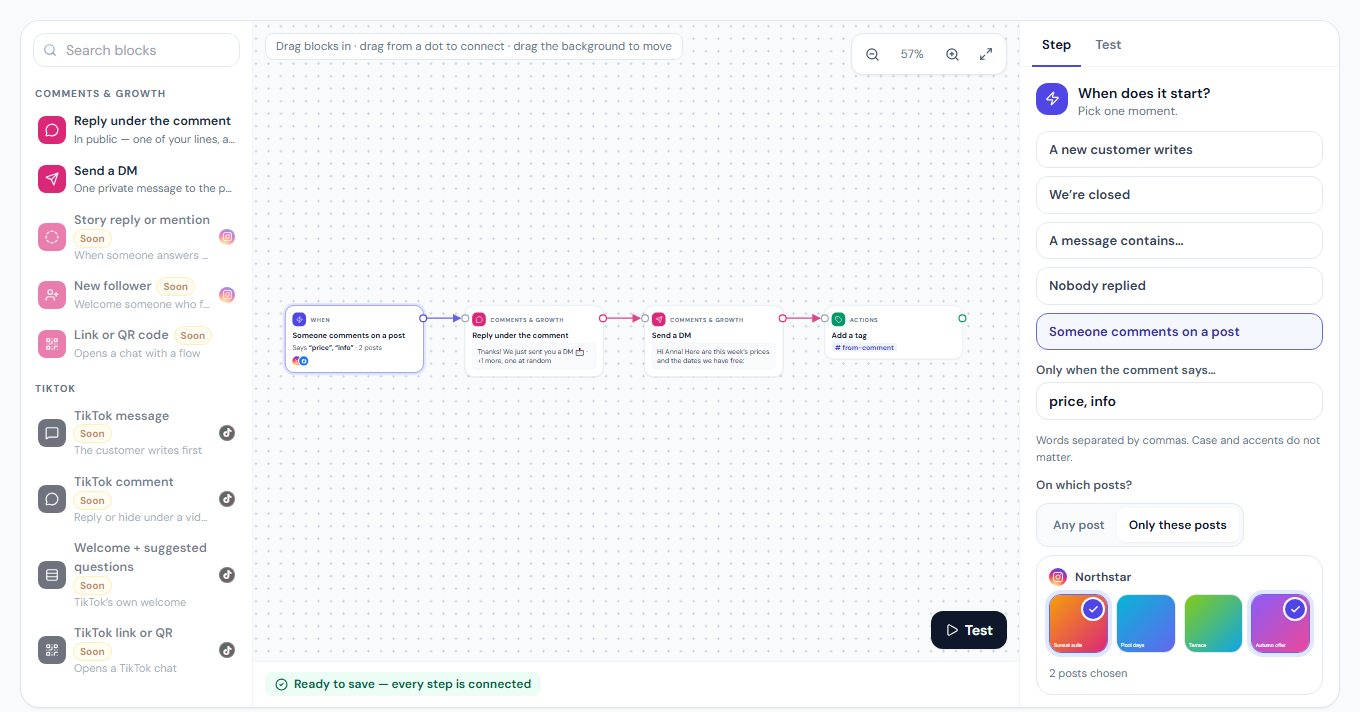
Press Visual at the top of the editor: the start is the comment, and «Reply under the comment» and «Send a DM» are blocks under Comments & growth. Add a tag or an email to you, or try two DMs with an A/B split. Test plays the comment, your reply and the DM before anything is sent.
3. What Instagram allows
- One DM per comment, within 7 days of it — Meta’s rule. MirageCHAT sends it at once.
- Once per person on each post. Someone who comments again on the same post is not messaged twice.
- If a DM cannot go out, the comment stays in
Commentsfor your team. - People who asked not to be messaged (STOP) get no DM.
- The conversation continues in the Inbox. When they answer, your AI, your team and your other automations take it from there.
4. Instagram, Facebook and TikTok
It works on Instagram professional accounts, on Facebook Pages and on TikTok accounts with comments turned on (Connect TikTok). A Page connected before 1 October 2026 needs ⋯ › Refresh permissions once, on its card in Channels, so its connection carries Meta's access to Page comments.
- Instagram: reply under the comment, send a DM, hide the comment — and like it, when the account is connected through its Facebook Page.
- Facebook Page: reply under the comment, send a DM, like it, hide it.
- TikTok: reply under the comment, like it, hide it. A DM from a TikTok comment comes with TikTok messages — coming soon.
- YouTube: reply under the comment, or hold it for review — once the channel’s owner or an admin allows automations on that channel. YouTube has no private messages and does not let apps like comments; at most 20 automated actions a day on each channel.
- An automation that only hides or likes runs on every matching comment; one with a reply or a DM runs once per person on each post.
- One automation runs per comment — the most specific one: chosen posts first, then words, then any comment.
5. YouTube: the owner allows it first
YouTube asks that a channel’s owner allow automations on its comments. Under Where should it run? each YouTube channel has Allow automations: read what an automation may do there, then press I allow it on this channel. Only the owner or an admin can allow it or withdraw it, and MirageCHAT records who did and when. Disconnecting the channel withdraws it.
- Only some: the YouTube channels are listed with their consent — a channel you allowed has its checkbox, any other says Allow first.
- About two minutes: YouTube does not announce new comments, so MirageCHAT reads a channel every 2 minutes while an automation can answer there.
- 20 a day: the list shows how many of the channel’s 20 automated actions were used today.
Does it answer every comment?
Only the ones with your words — or every comment, if you leave the words empty. Your own comments and replies never start it.
Which plans include it?
Every paid plan. The reply under a comment, the like, hiding it, the DM to the person who commented and automations on TikTok comments are in Starter, Growth and Pro alike.
Can it hide spam?
Yes. Add «Hide the comment» with the words spam uses — «free followers», «promo», «dm me» — and it hides every comment that says them, on Instagram, Facebook Pages and TikTok. It matches the words you type; it does not look for links. The ready-made flow «Hide spam comments» starts you off — Hide comments on Instagram.
Can I see what it sent?
Yes. The DM appears in the Inbox as a conversation, marked as automated. In Comments the comment stays under its post, and once it is answered it is no longer marked «Waiting».
Ready?
Opens MirageCHAT in this tab. Sign in first if you’re not already.
Did this guide help?
Related guides
Still stuck? Write to info@miragechat.io with your workspace name. Never send passwords or codes.