In short
The AI answers Instagram DMs from what you teach it — prices, rooms or services, what’s included, how to book. When a question needs a person, it says your team will confirm and hands the conversation over. It does not write bookings into a calendar by itself: a person on your team confirms the booking.
Before you start
- A paid package — Starter, Growth or Pro — or the free trial. Free has no AI.
- An Instagram professional account connected in
Channels— Connect Instagram. - Your website, price list or the facts you want it to use.
1. Teach it your offer
In AI › Libraries, add your website and your documents: prices, what’s included, check-in times, the cancellation policy, how to book. The AI answers only from this — Teach the AI with libraries.
2. Turn it on for Instagram
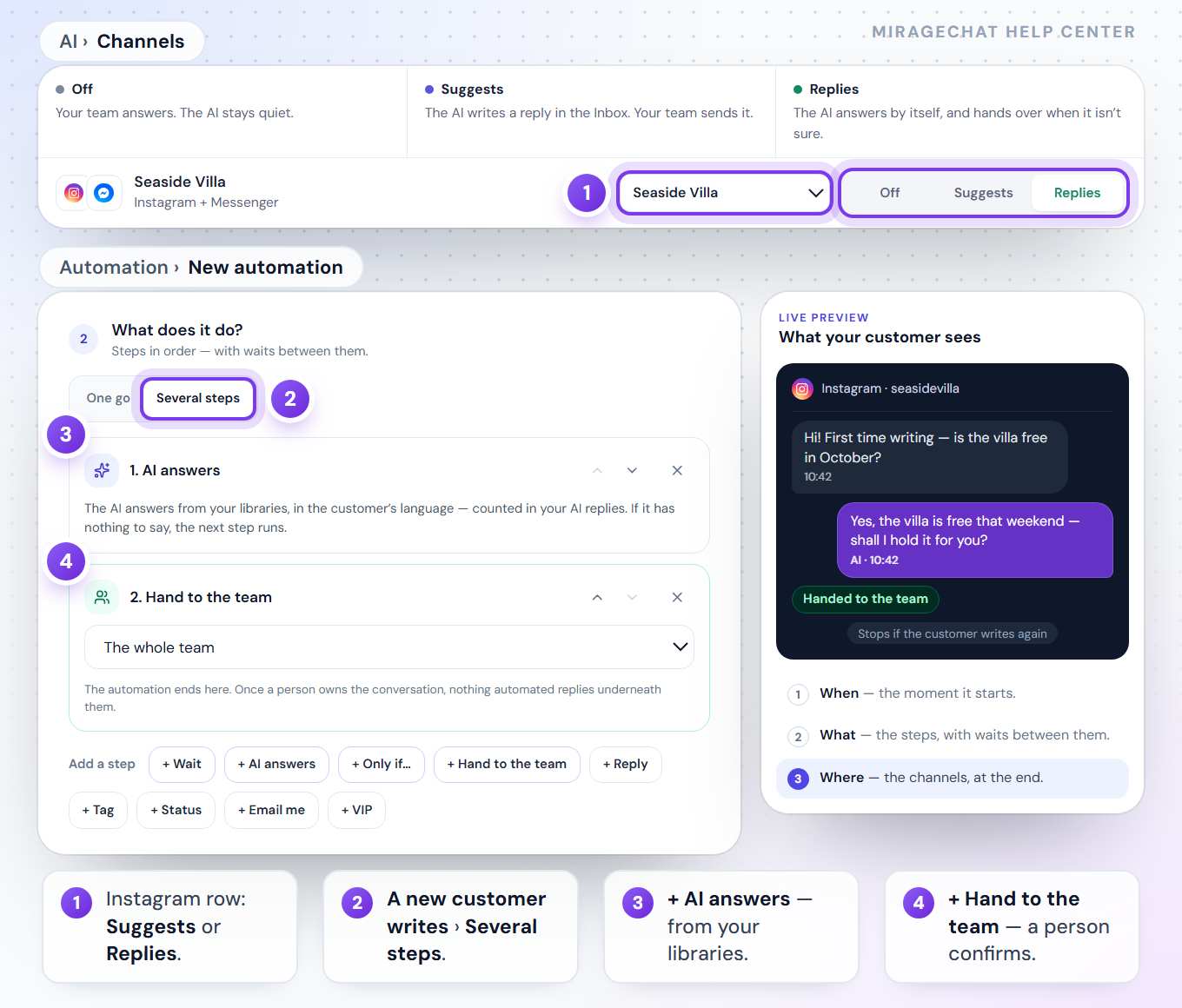
Open AI › Channels
Find your Instagram account and choose the library it reads.
Choose how it works
Suggests — it writes a reply in the Inbox and your team sends it. Replies — it answers by itself and hands over when it isn’t sure.
Test it
In the Test tab, ask what a customer would ask. Nothing is sent to anyone.
3. Hand the booking to a person
Build the steps
In
Automation, press New automation, pick A new customer writes, then Several steps.AI answers
Add + AI answers: it answers from your libraries, in the customer’s language. If it has nothing to say, the next step runs.
Hand to the team
Add + Hand to the team and choose a person or the whole team. The automation ends there: once a person owns the conversation, nothing automated replies underneath them.
Live availability from your own system
If your booking system has an API, Security › Developer › AI Tools lets the AI call it while it answers — for availability or prices, live. It needs AI Tools in your package and works with Claude models only. Anything it books is booked by your own system.
What to know
- It never invents a price or a free date. What isn’t in your libraries or your tool’s answer, it leaves for your team to confirm.
- Questions it couldn’t answer wait for you in
AI › Overviewunder To do. Answer once, and it knows next time. - Not yet: sending the booking planner and a payment request from inside a flow are marked «Soon» in the editor.
- The same works on WhatsApp, Messenger, Telegram and your website chat — each channel has its own row in
AI › Channels.
Can the AI confirm a booking by itself?
No. It answers from your information and a person confirms. Only your own system can book, through AI Tools.
What happens when it doesn’t know?
It says your team will confirm, and the question waits for you in AI › Overview.
Ready?
Opens MirageCHAT in this tab. Sign in first if you’re not already.
Did this guide help?
Related guides
Still stuck? Write to info@miragechat.io with your workspace name. Never send passwords or codes.