In short
Hiding a comment keeps it visible to the person who wrote it and to nobody else. Nothing is deleted, and you can undo it. Hide one comment from Comments, or let an automation hide every comment that says the words you choose.
Before you start
- An Instagram professional account connected in
Channels— Connect Instagram. - Agents: Reply + hide/delete for Comments in
Team › Agents. Owners and admins can always hide.
1. Hide one comment
Open the post
Click
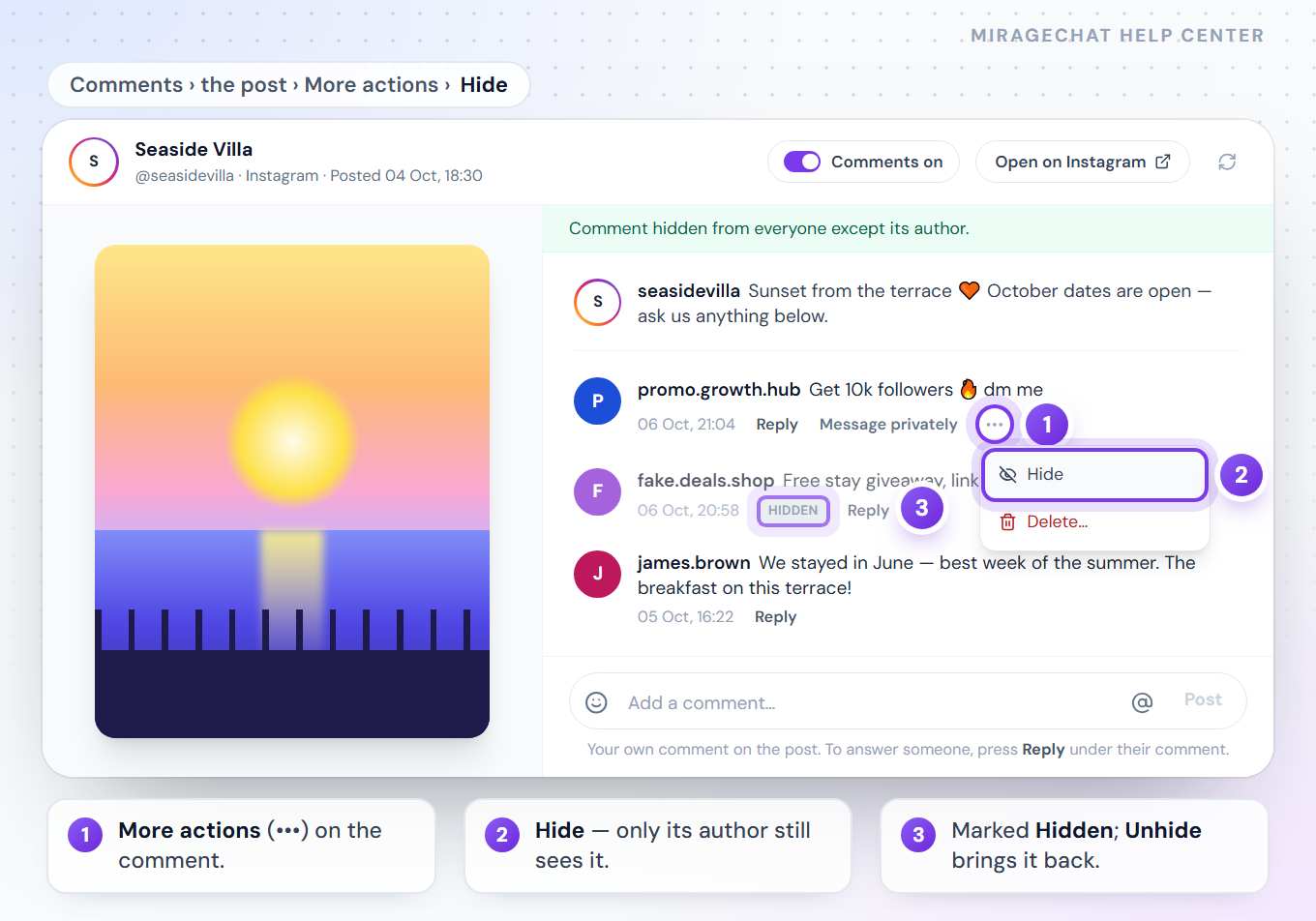
Commentsin the menu and open the post. Its comments appear beside it, the newest questions on top.Hide it
On the comment, press More actions (•••) › Hide. The message says Comment hidden from everyone except its author. and the comment carries a Hidden mark.
Undo it
The same menu now says Unhide. Press it and the comment is visible again.
2. Hide comments automatically
Start an automation
Go to
Automation, press New automation and, under When?, pick Someone comments on a post.Type the words
Write the words to catch, separated by commas — for example
scam, spam, fake. Case and accents do not matter, and it matches whole words: spam matches «Spam!», but hi does not match «this». Up to 20 words or short phrases.Choose the posts
Any post, or Only these posts and tap them.
Add «Hide»
Under What does it do?, press + Hide. The step is called Hide the comment.
Pick the accounts and save
Under Where should it run? choose your Instagram accounts, then press Save automation. It works from that moment.
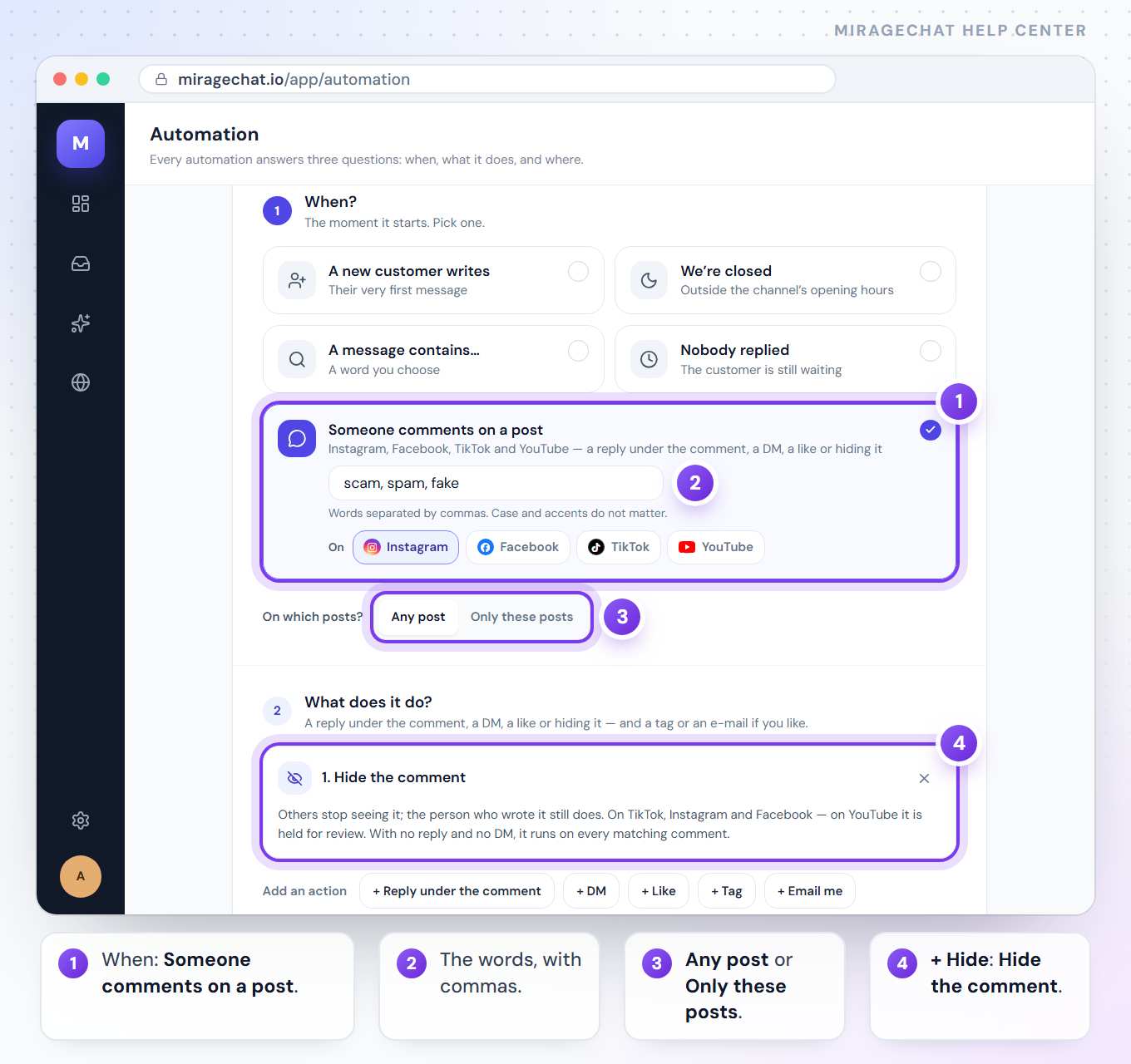
In the Visual editor the same block is Hide the comment under Comments & growth, and the ready-made flow Hide spam comments starts with the words scam, spam and fake.
What to know
- Your own posts only. On someone else’s post that mentions you, you can reply — Hide and Delete are for your own posts.
- An automation that only hides runs on every matching comment. One that also replies or sends a DM runs once per person on each post.
- One automation per comment. When several could run, the most specific one does: chosen posts first, then words, then any comment. Keep spam-hiding and comment → DM on different words.
- It reads words, not links. Add the words spam usually says, such as
promo, followers, dm me. - Your own comments and replies never start it. Comments on live videos don’t either.
Hide or delete?
Hide can be undone and the person who wrote it still sees their comment. Delete (••• › Delete… › Delete) removes it for everyone, for good — and automations never delete. More in Answer comments, mentions and reviews.
I don’t see Hide.
Ask the owner for Reply + hide/delete in Team › Agents. On someone else’s post that mentions you, Hide is not offered.
Can it hide comments with links?
It doesn’t look for links. It hides comments with the words you type.
Can I hide and send a DM with the same words?
One automation runs per comment, so put both steps in the same automation, or use different words for each.
Ready?
Opens MirageCHAT in this tab. Sign in first if you’re not already.
Did this guide help?
Related guides
Still stuck? Write to info@miragechat.io with your workspace name. Never send passwords or codes.