In short
TikTok has two rules. In the TikTok app, you can delete comments under your own videos. Through an app like MirageCHAT, TikTok lets a business hide other people’s comments and delete only its own. MirageCHAT also lets you reply in public and like comments, by hand or with an automation.
Before you start
- A TikTok account connected in
Channelswith comments on — press Turn on on its card if it says comments are not turned on yet. Connect TikTok. - Agents: Reply + hide/delete for Comments in
Team › Agents.
1. Delete a comment in the TikTok app
Under your own video, press and hold the comment and choose Delete. This is TikTok’s own app; through any other app, TikTok keeps the rules below.
2. Hide, delete, reply or like in MirageCHAT
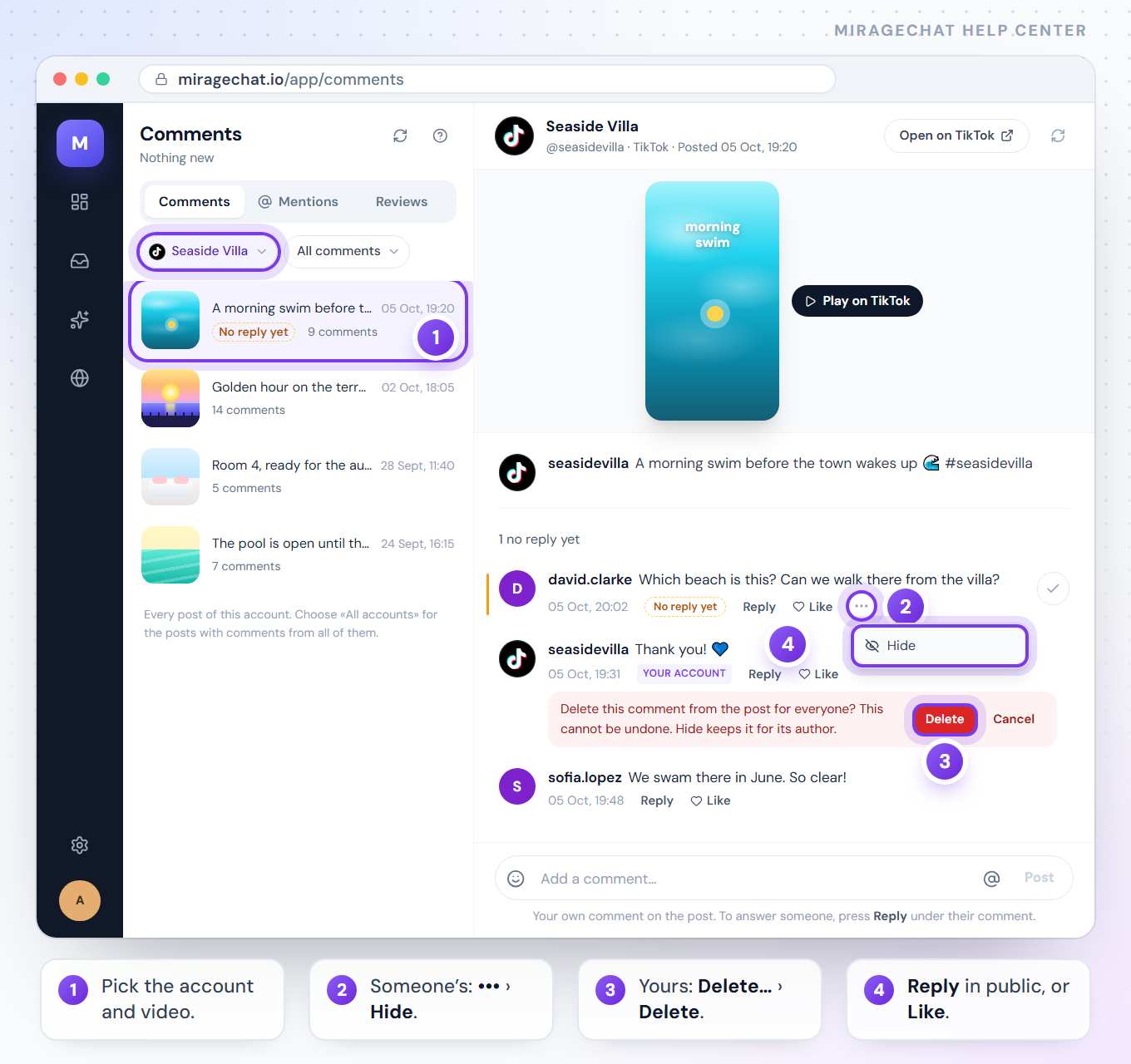
Open the video
Click
Comments, choose your TikTok account in All accounts and open the video. It plays beside its comments.Hide someone’s comment
More actions (•••) › Hide. Others stop seeing it; Unhide brings it back.
Delete your own comment
More actions › Delete… › Delete. It appears only on your account’s own comments.
Reply or like
Reply posts a public answer under the comment, up to 1,200 characters. Like adds a like from your account.
3. Do it automatically
In Automation, Someone comments on a post works on TikTok too: reply under the comment, like it and hide it run by themselves for the words you choose. Automations never delete. More in Reply to comments with a DM.
What TikTok allows
- Delete only your own comments through an app; everybody else’s can be hidden.
- Public replies only. TikTok doesn’t let a business send a private message from a comment yet, so a DM step is skipped on TikTok and the other steps run.
- Comments on your own videos. When someone mentions you under their video, you can reply.
- A few minutes late, sometimes. TikTok can send a new comment up to 5 minutes after it was written.
Why can’t I delete someone else’s comment here?
TikTok lets apps delete only the account’s own comments. Hide it here, or delete it in the TikTok app.
TikTok says it gave no access to comments.
Connect the account again and allow comments on TikTok’s screen.
Ready?
Opens MirageCHAT in this tab. Sign in first if you’re not already.
Did this guide help?
Related guides
Still stuck? Write to info@miragechat.io with your workspace name. Never send passwords or codes.