In short
An automation can hide every comment on your Facebook Page posts that says the words you choose — spam, insults, the words you never want under a post. A hidden comment stays visible only to the person who wrote it and their friends; nothing is deleted, and you can unhide any of them.
Before you start
- A Facebook Page connected in
Channels— Connect a Facebook Page. - A Page connected before 1 October 2026: press ⋯ › Refresh permissions on its card in
Channelsonce, then Edit settings in the Facebook window and keep every permission ticked.
1. Set up the automation
Start it
Go to
Automation, press New automation and, under When?, pick Someone comments on a post.Type the words
Separated by commas — for example
scam, spam, fake. Whole words only, and case and accents do not matter. Up to 20 words or short phrases.Choose the posts
Any post, or Only these posts.
Add «Hide»
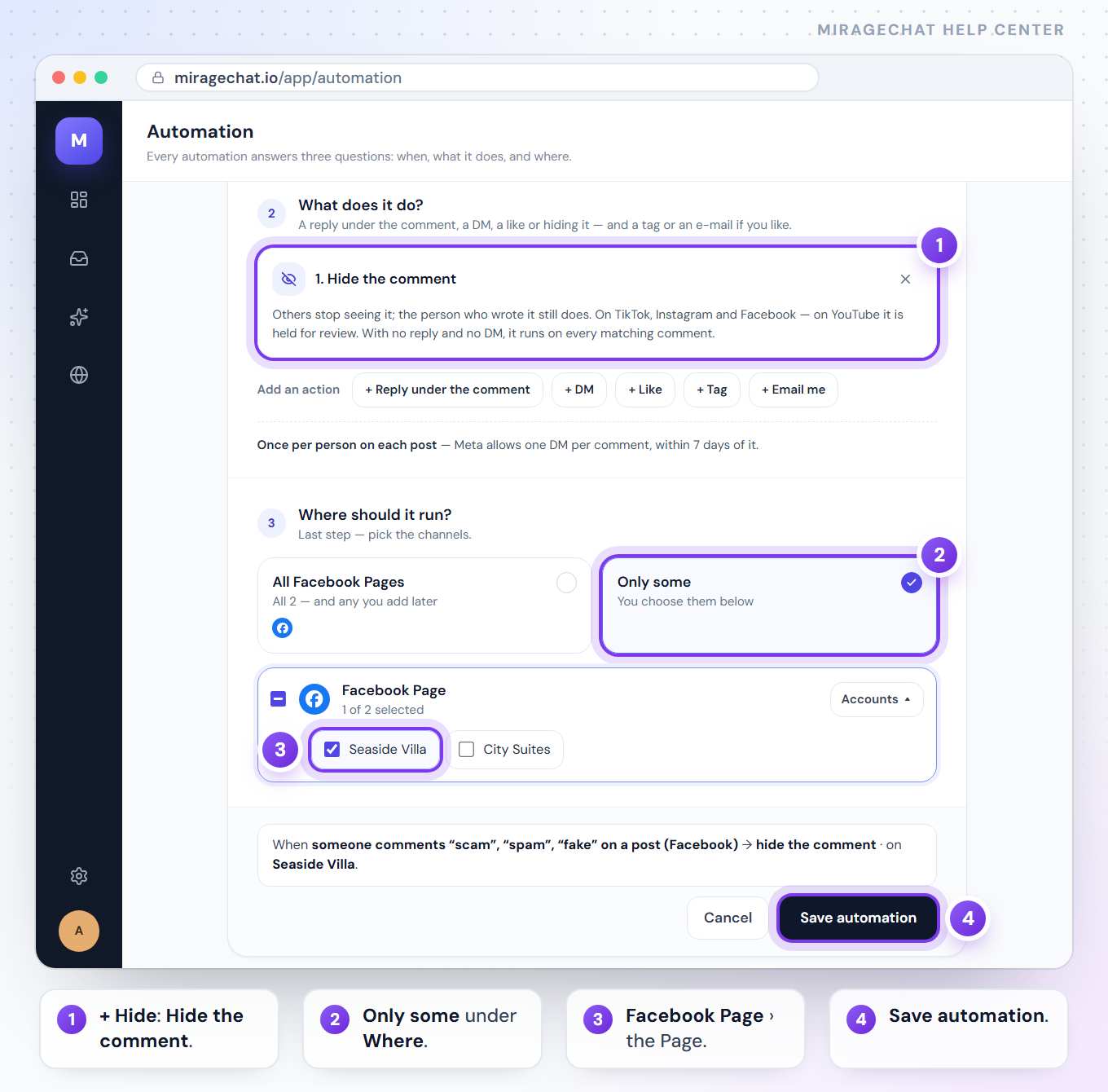
Under What does it do?, press + Hide.
Choose the Page and save
Under Where should it run? tick Facebook Page and pick the Page, then press Save automation.
2. Hide or unhide one comment
In Comments, open the post and press More actions (•••) › Hide on the comment. The same menu has Unhide.
What to know
- Facebook doesn’t let a Page hide its own comments. The Page can delete them instead.
- Who still sees a hidden comment is Facebook’s rule: the person who wrote it, and their friends.
- It runs on every matching comment when it only hides. With a reply or a DM, it runs once per person on each post.
- One automation per comment — the most specific one: chosen posts first, then words, then any comment.
- It reads words, not links, and your Page’s own comments never start it.
My Page shows no Hide.
If the comment is the Page’s own, Facebook allows only Delete. If the Page asks for One more permission, press Refresh permissions › once.
Does it also work on Instagram?
Yes — tick your Instagram accounts under Where should it run? too. See Hide comments on Instagram.
Ready?
Opens MirageCHAT in this tab. Sign in first if you’re not already.
Did this guide help?
Related guides
Still stuck? Write to info@miragechat.io with your workspace name. Never send passwords or codes.