In short
Growth asks one question — what do you want to do? Send an offer on WhatsApp, turn a post into customers, or see what each one brought. A campaign picks its clients from Customers; a Post button lives here too.
Before you start
- A paid plan — Growth is in every paid plan.
- For WhatsApp offers: a connected WhatsApp number and an approved Marketing template — Connect WhatsApp · Message templates.
- For post campaigns: Instagram, a Facebook Page or TikTok connected, and a post sent with Instant Post.
- An agent needs Campaigns in
Team › Agents.
What is on the page
| Part | What it does |
|---|---|
| Campaigns | Three ways to start, this month’s numbers, and every campaign you made. |
| Your clients | A line that says where they live — Customers — with Open Customers and Import. |
| What it brought | The money your campaigns brought in the last 30 days, campaign by campaign. |
| Post | Opens Instant Post right here, for anyone allowed to post. |
| ? | The Help beside the page: How it works, Set it up, Who it’s for and Rules. |
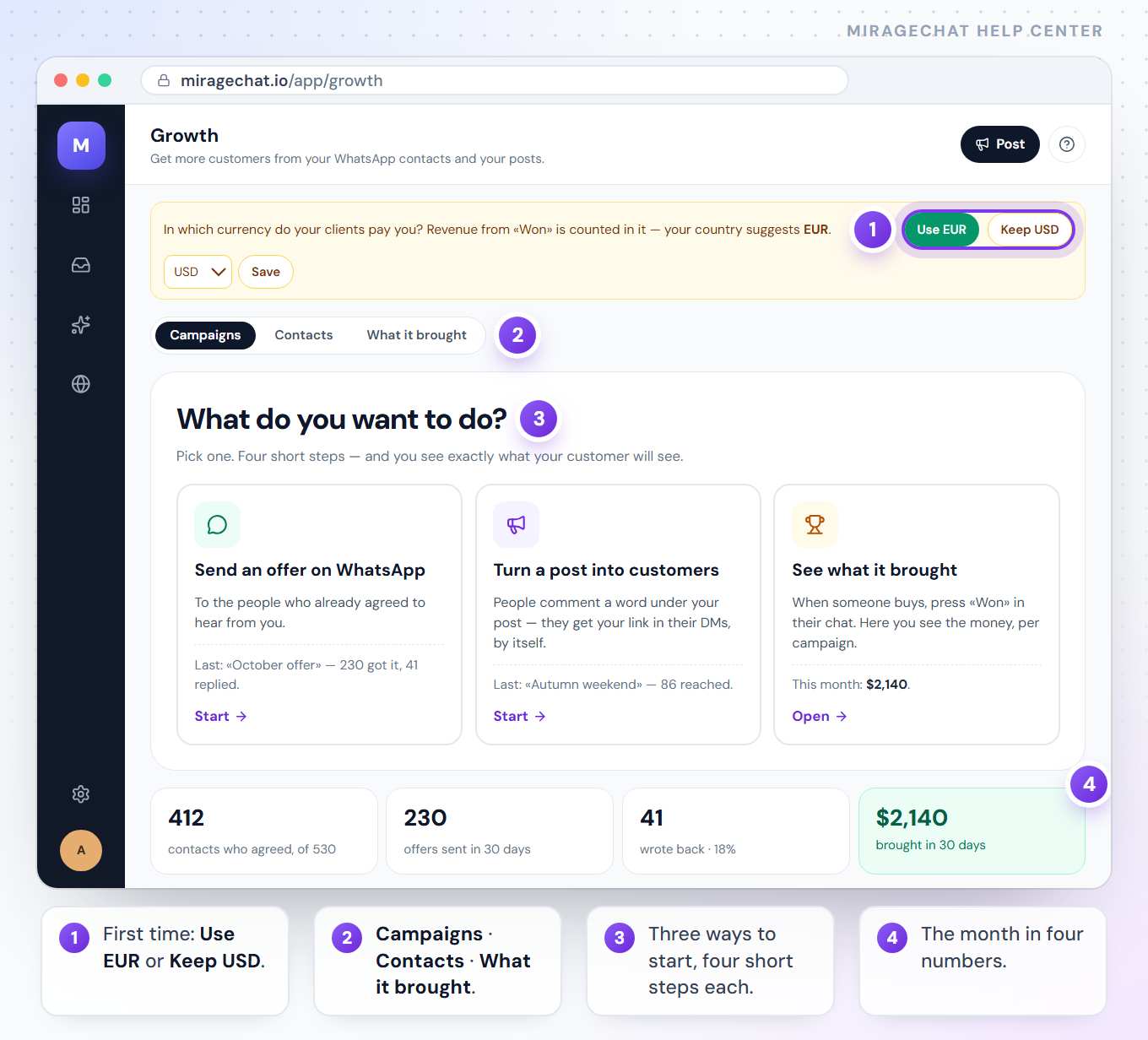
1. Set your currency once
Answer the yellow bar
The first time, an owner or admin sees “In which currency do your clients pay you?” Press Use EUR when your country’s suggestion is right, Keep USD, or choose another and press Save.
Change it later
Press the currency code beside brought in 30 days. A new currency applies to new sales; the ones already counted keep theirs.
2. Pick what you want to do
Under What do you want to do? on the Campaigns tab, three choices. Each opens four short steps with a preview of what your customer sees:
- Send an offer on WhatsApp — to the people who already agreed to hear from you. Guide: Send an offer on WhatsApp.
- Turn a post into customers — people comment a word under your post and get your link in a DM. Guide: Turn a post into customers.
- See what it brought — press Won in a chat when someone buys, and Growth adds it to the campaign that reached them. Guide: See what a campaign brought.
Under them, four numbers: people who said yes, offers sent in 30 days, wrote back and brought in 30 days.
3. Your clients are in Customers
Growth has no list of its own: everyone lives in Customers — who wrote to you on any channel, and who you added or imported. Each person there shows Marketing (Subscribed, Not asked or Said STOP) and Source; a campaign picks a group, one of your lists or a tag from there.
Bring more people
Press Import — on Customers, on this page, or in a campaign’s Who gets it?: a CSV file, cells copied from Excel or Google Sheets, or the people who wrote to you on WhatsApp.
Record a yes
Open the person in Customers: under Marketing on WhatsApp, They agreed… asks where and when — for example “They messaged us and asked” — and keeps the answer.
Remove someone who never wrote
Open them in Customers and press Remove from your client list.
4. Run your campaigns
Under Your campaigns, each one reads as a sentence — for example “Sent to 120 · 80 read it · 12 replied” — with what it brought on the right. Press one to open its report. A WhatsApp campaign offers:
- Edit and send — while it is a draft.
- Cancel the schedule — before it goes out.
- Pause and Resume — while it is sending.
- Resend to 40 who didn't read — after it was sent; the number is theirs.
- Duplicate, and the bin to delete it.
The report lists every person with what happened — Delivered, Read, Clicked, Replied, Unsubscribed — and Chat opens their conversation.
Good to know
- Only people who agreed get offers. STOP, and WhatsApp’s own “stop marketing”, always win.
- Meta charges WhatsApp messages to your own account. MirageCHAT adds nothing on top.
- Replies land in the Inbox, where your AI and your team answer as usual.
- Help is one click away: the ? button opens it beside the page; on a narrow screen it slides up from the bottom.
- Campaigns made before Growth are still listed, with what they sent.
If something looks wrong
Growth shows a lock
Growth is not in the Free plan. Press See packages and choose a paid one — it opens at once.
“Growth could not load. Try again in a moment.”
The page could not reach MirageCHAT. Refresh it; your campaigns are not affected.
I don’t see the Post button
It shows for people allowed to post with Instant Post. Ask the owner for Post access to Social Studio.
Where did Customers › Campaigns go?
Into Growth, on 4 October 2026. The old address opens Growth.
Where did Growth › Contacts go?
Into Customers, on 8 October 2026 — one list of everyone, with the same consent, tags and imports.
On your phone
In the MirageCHAT app, open Menu › Growth: the month’s numbers, your campaigns, and WhatsApp campaign, Post and Post campaign. A campaign’s To picks a group, a list or a tag of your clients. To import a file, use Customers › Import on the website.
Ready?
Opens MirageCHAT in this tab. Sign in first if you’re not already.
Did this guide help?
Related guides
Still stuck? Write to info@miragechat.io with your workspace name. Never send passwords or codes.