In short
You can reply freely for 24 hours after a customer’s last message. To write first, or later than that, WhatsApp requires a template that Meta has approved. You create it in MirageCHAT; the status updates by itself.
Create a template
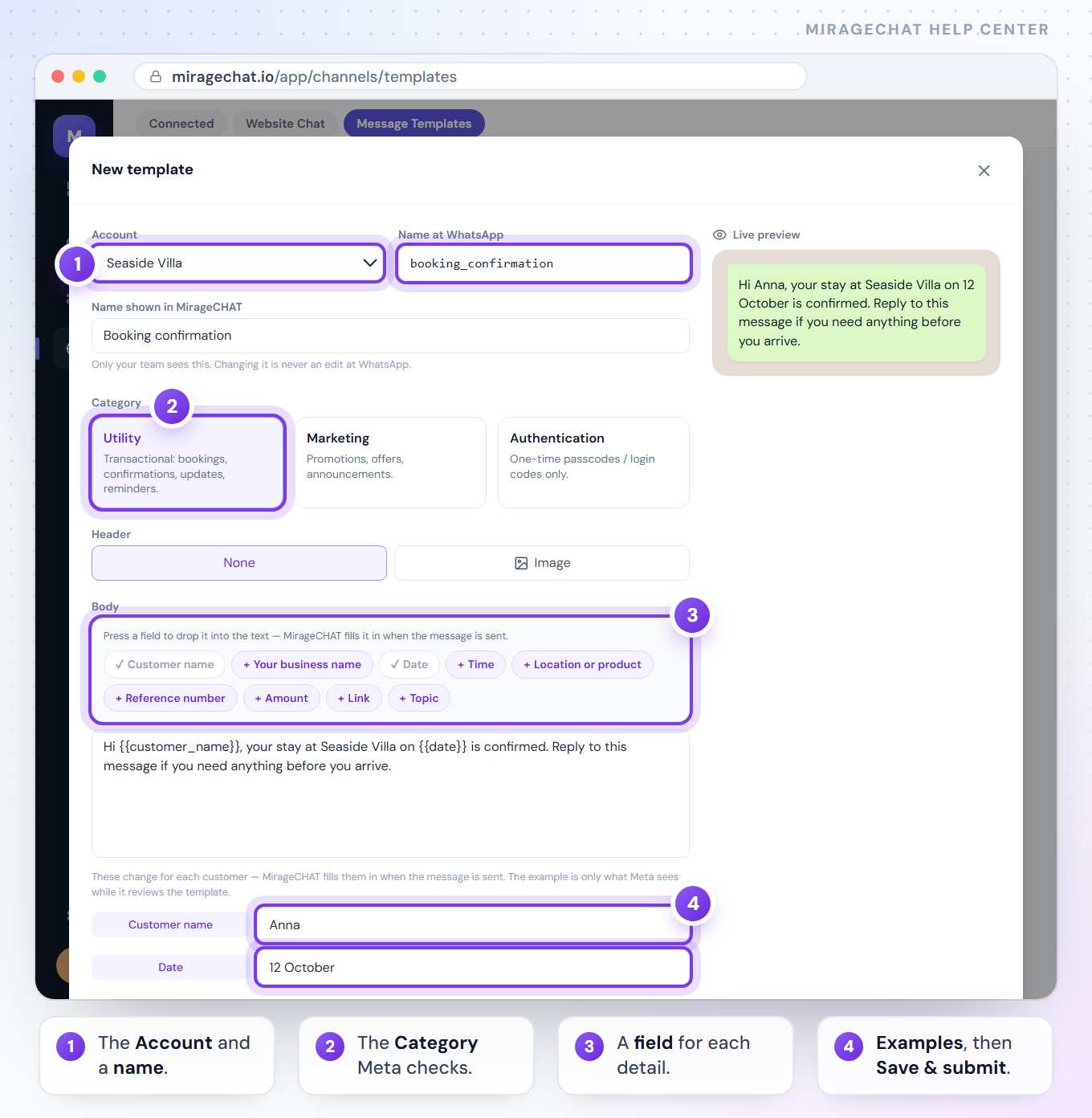
Open Message Templates
In MirageCHAT:
Channels › Message Templates, then Create template.Choose the number and a name
Pick the WhatsApp account. The name is only for you: lowercase letters, numbers and underscores.
Choose the category
Meta checks this choice — see the table below.
Write the message
Up to 1,024 characters. Add fields for anything that changes per customer — a name, a date, an amount — with the buttons above the text box. You can add a header image (JPG or PNG, up to 5 MB) and up to 2 link buttons or 3 quick-reply buttons.
Give each field a real example
Meta reviews the example, not live data — so keep it true to what you will really send. Then submit.
Which category
| Category | Use it for |
|---|---|
| Utility | A specific update the customer expects: order or booking confirmations, appointment reminders, account or delivery updates, billing. |
| Marketing | Anything promotional: offers, announcements, product news, bringing customers back. Anything not strictly transactional counts as Marketing. |
| Authentication | One-time passcodes only: sign-in, verification, account recovery. Fixed wording and a copy-code button. |
How long approval takes
Usually instant for verified businesses, otherwise up to about 24 hours. The status in MirageCHAT updates automatically. A category that doesn’t match the message is rejected — pick the one that describes what you really send.
Good to know
- Proofread: spelling mistakes can get a template flagged as spam.
- A field can’t start or end the message, and two fields can’t sit next to each other — put a word between them.
- Never include full card numbers, bank account numbers or ID numbers in a template.
- Meta charges for every template it delivers, on your own account — since 1 October 2026 a utility template sent within the 24 hours too. What Meta charges for
- Meta doesn’t deliver marketing templates to US (+1) numbers.
Ready?
Opens MirageCHAT in this tab. Sign in first if you’re not already.
Did this guide help?
Related guides
Still stuck? Write to info@miragechat.io with your workspace name. Never send passwords or codes.