In short
Your WhatsApp number isn’t locked to the platform you use today. Connect it in MirageCHAT — the number, its display name, quality and limits come with it. How depends on one question: is the number also in the WhatsApp Business app on a phone?
Which case is yours?
- Case A — the number is also in the WhatsApp Business app on a phone, and the platform answers the same chats. You only switch partners; the app and its chats stay as they are. About 5 minutes.
- Case B — the number works only through the platform, with no app on any phone. MirageCHAT is added next to the platform, with its own templates and billing — or, if Meta asks, the number moves. About 10 minutes.
Before you start
- Full control of your business portfolio at Meta.
- Access to the number — Meta may send it a code by text message or phone call.
- Want the old conversations? Export them from the old platform first. Its inbox stays there; Meta doesn’t keep message history for you.
Case A — the number is in the WhatsApp Business app
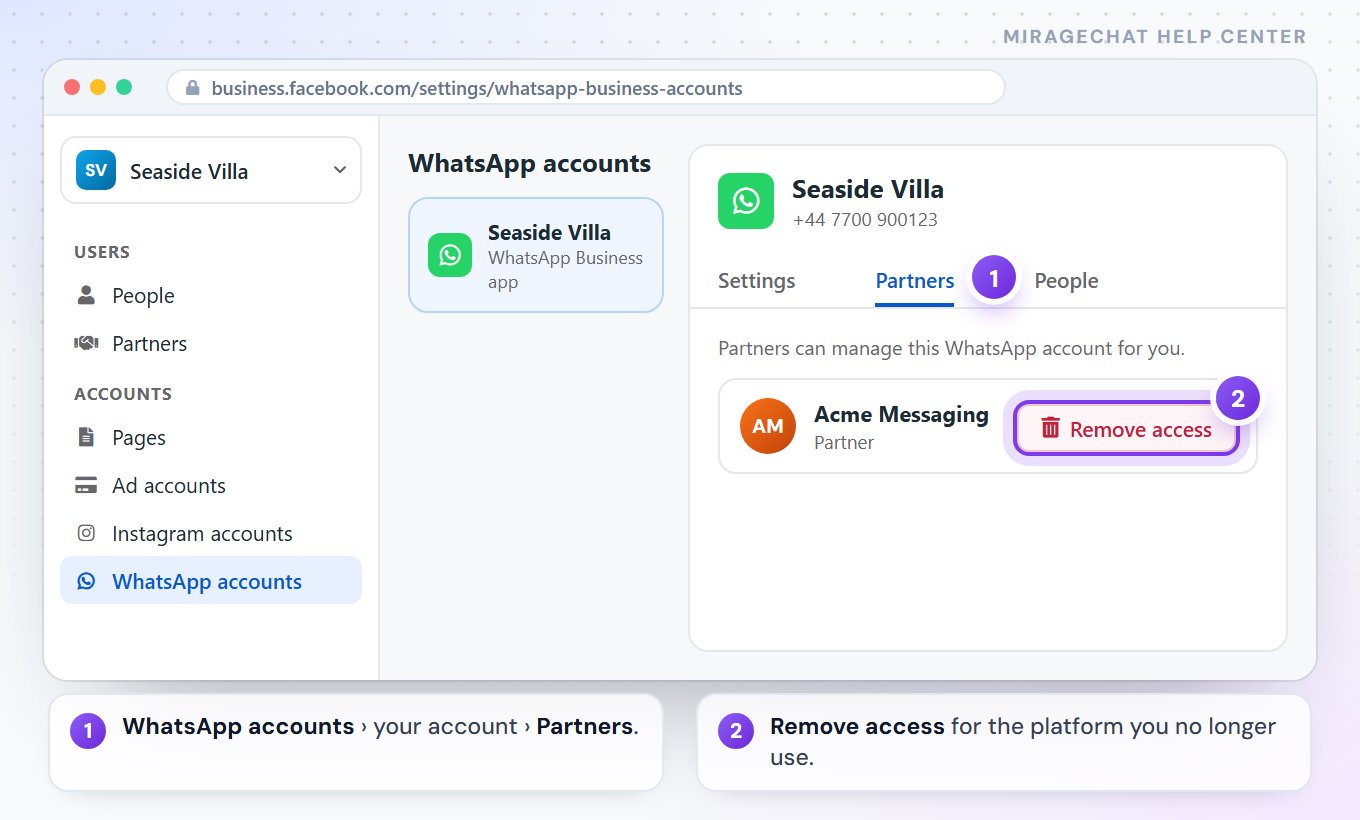
Remove the old platform at Meta
At business.facebook.com:
Settings › Accounts › WhatsApp accounts, choose the account, open Partners, choose the old platform and press Remove access.Disconnect it on the phone
WhatsApp Business ›
Settings › Account › Business platform, tap the old platform, press Disconnect.Connect in MirageCHAT
Channels› WhatsApp › Connect the number on my phone, then Meta’s window. Up to 6 months of chats can be copied in.
Case B — the number works only through the platform
Meta is moving every WhatsApp account to a new model (it rolls out through the second half of 2026): one number can work with more than one platform, and each platform gets its own Messaging account — its own templates and its own billing. Nothing is moved, and messages don’t pause.
Find where the number lives
At business.facebook.com, open your portfolio and
Settings › Accounts › WhatsApp accounts. If you see the number’s account there, it’s yours. If you don’t, it sits in the platform’s own portfolio — nothing is wrong, the next step finds it.Connect in MirageCHAT
Channels› WhatsApp › Connect a dedicated number. In Meta’s window choose your portfolio, then the number’s WhatsApp account and the number. If the account isn’t in your portfolio, choose Add a new number, enter it, and type the code Meta sends.Add a card and your templates
MirageCHAT’s Messaging account starts empty: add a payment method to it, and create your templates in MirageCHAT. The old platform’s templates stay with the old platform.
Close the old platform
Once MirageCHAT says “WhatsApp connected: +…”, remove the old platform under Partners and end its subscription. While both are connected, Meta decides which of them receives each conversation.
If Meta says the number is in use
Then your WhatsApp account hasn’t moved to Meta’s new model yet, and the number has to leave the old platform first. Open one lock, then connect again:
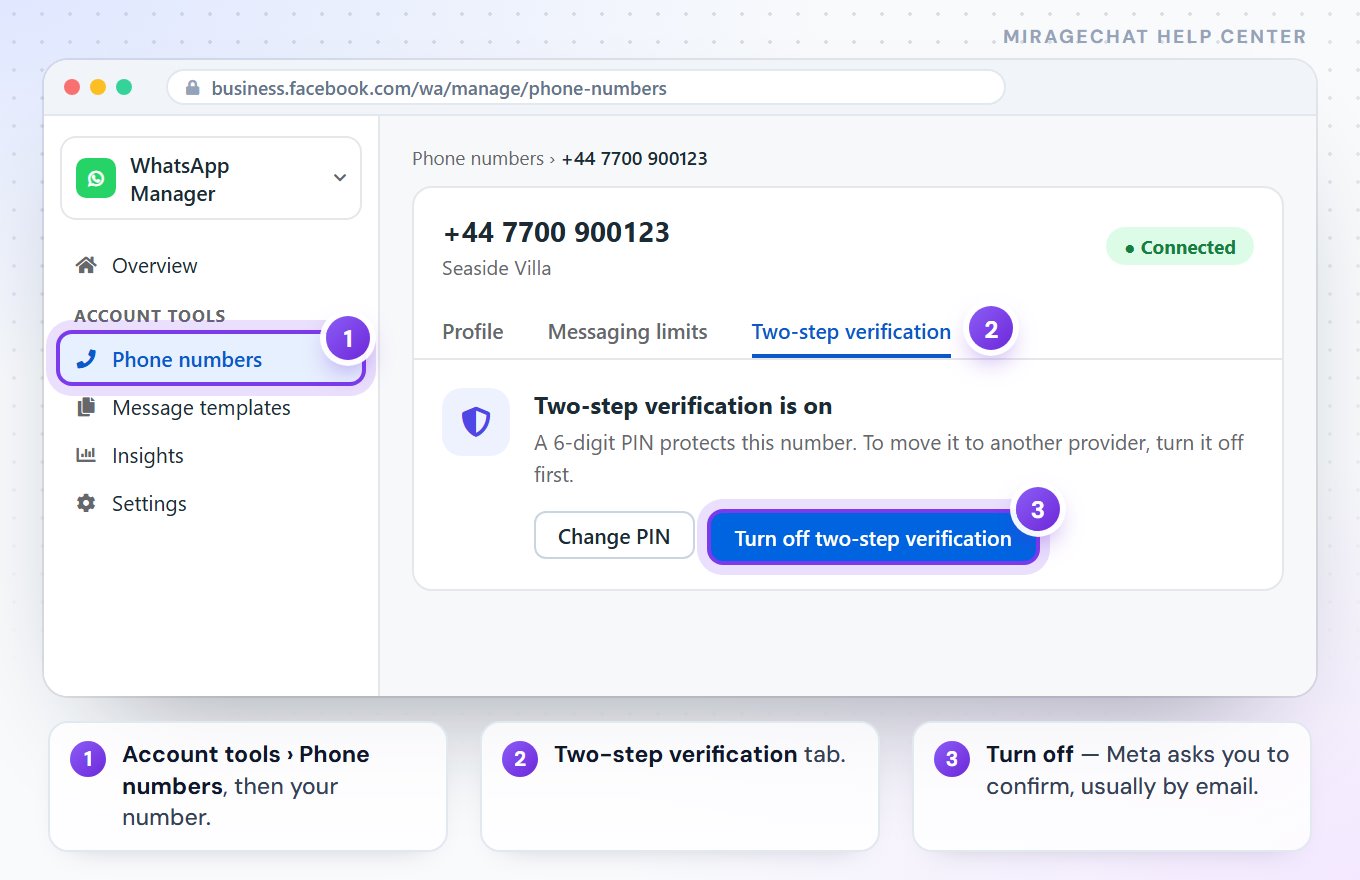
Turn off two-step verification
Open WhatsApp Manager ›
Account tools › Phone numbers, choose the number, open Two-step verification and press Turn off two-step verification. Meta asks you to confirm, usually by email. Not your account? Ask the old platform to turn it off for you.Connect again
Repeat Connect a dedicated number in MirageCHAT. This time the number moves, which takes a few minutes.
Moving the number? Do it at a quiet hour. Between turning on MirageCHAT and switching the old platform off, a message can arrive in either place — the move itself takes a few minutes.
What comes with you
| What | Comes with you |
|---|---|
| Phone number and display name | Yes — customers see no change. |
| Quality rating and messaging limit | Yes — you start where you were. |
| Business verification | Yes — it belongs to your portfolio, not to the platform. |
| Payment method | MirageCHAT’s Messaging account needs its own — add a card. Meta bills it to your portfolio. |
| Message templates | No — each platform keeps its own. Create yours in MirageCHAT; Meta reviews each one. |
| Old conversations | Case A: they stay on the phone, and up to 6 months come in. Case B: only what you exported. |
| Automations and flows | No — they are the old platform’s. Rebuild them in minutes. |
Stuck on “This phone number is already registered”? Something still holds the number — four checks find it.
Meta sometimes renames a button or swaps two screens in its own window. If a name here differs, the step itself stays the same.
Ready?
Opens MirageCHAT in this tab. Sign in first if you’re not already.
Did this guide help?
Related guides
Still stuck? Write to info@miragechat.io with your workspace name. Never send passwords or codes.