In short
Your MirageCHAT plan doesn’t include WhatsApp message charges. Meta bills them per message to your own business portfolio, so it needs a card on file. Since 1 October 2026 Meta gives each number 1,000 free replies a month; after that each reply is charged, and so is every template.
Steps
Open WhatsApp Manager
At business.facebook.com:
Settings › Accounts › WhatsApp accounts, choose your account and press WhatsApp Manager.Go to payment methods
In the menu, open
Account tools › Payment methods.Add a card
Press Add payment method, enter the card and save.
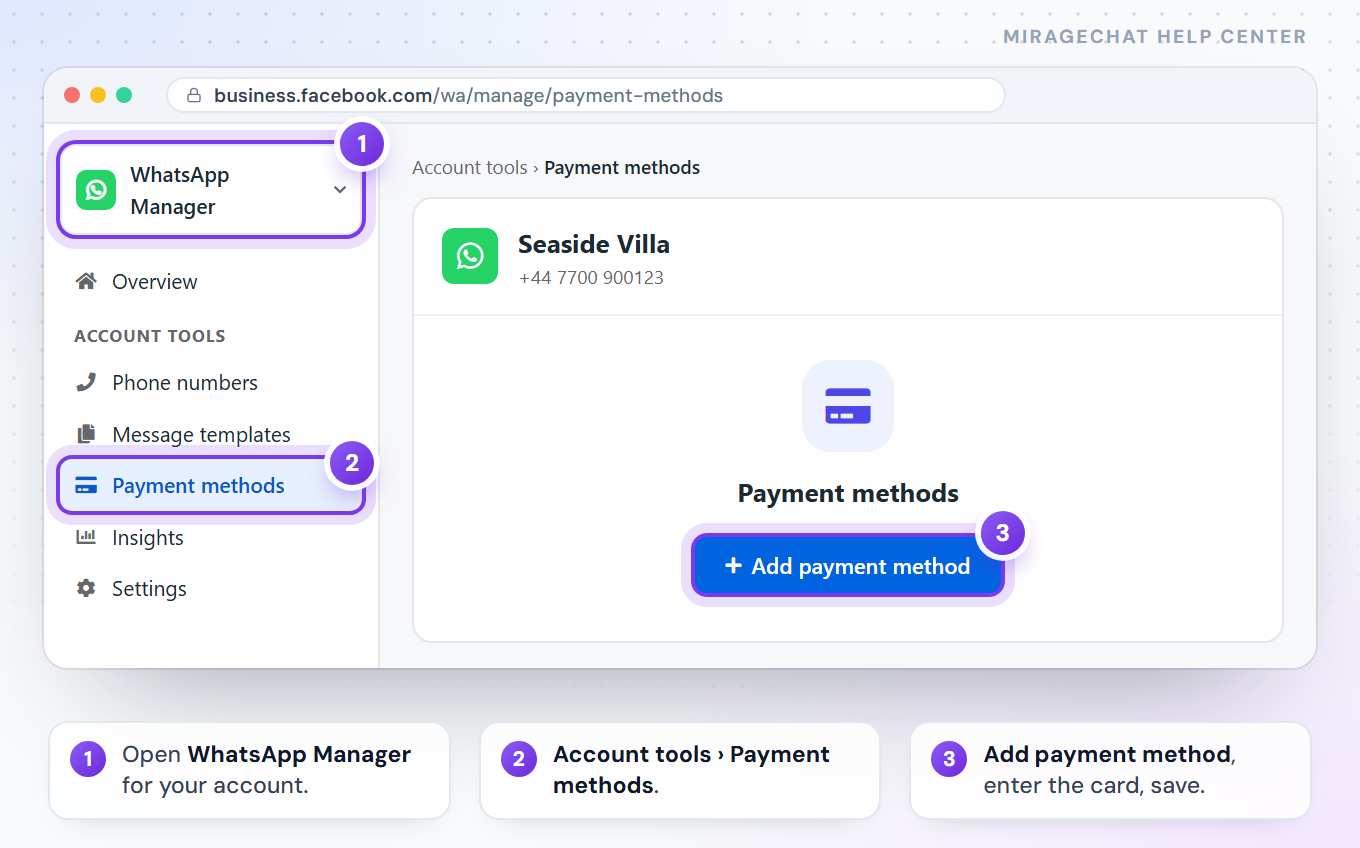
Meta sometimes renames a button or swaps two screens in its own window. If a name here differs, the step itself stays the same.
Good to know
- What Meta charges for: every template message — marketing, utility and authentication. Since 1 October 2026 that includes a utility template sent within the 24 hours, and your replies within 24 hours after the first 1,000 each month for each number. About templates
- What it doesn’t: the first 1,000 replies a month for each number (they don’t roll over), reactions, and the messages customers send you. When a customer writes from a click-to-WhatsApp ad on their phone and you answer within 24 hours, Meta charges nothing for up to 7 days.
- United States: Meta doesn’t deliver marketing templates to US (+1) numbers.
- No card on file? The free replies still go out. Replies after the 1,000th, and every template, don’t.
- Where you see the bill: at Meta, in your business portfolio — never on your MirageCHAT invoice.
Ready?
Opens MirageCHAT in this tab. Sign in first if you’re not already.
Did this guide help?
Related guides
Still stuck? Write to info@miragechat.io with your workspace name. Never send passwords or codes.