In short
A package decides how many accounts you connect and how many AI replies are included. Every paid package has every feature, except WhatsApp calls, which are in Growth and Pro, and the Publishing API, which is in Pro. Workspace › Your package shows yours and how much of it you use; you change it under Billing.
Before you start
- You are the owner, an admin or a manager — the package is theirs to see.
- Nothing is bought on this page. A package is chosen or changed under
Billing › Plan.
The four packages
| Package | Price | Connected accounts | AI replies a month | Team members |
|---|---|---|---|---|
| Free | $0 | 2 | None | 1 |
| Starter | $19.99 a month, or $199.90 a year | 5 | 100 | Unlimited |
| Growth | $39.99 a month, or $399.90 a year | 12 | 500 | Unlimited |
| Pro | $59.99 a month, or $599.90 a year | 25, then $1.75 a month for each one more | 1,000 | Unlimited |
Free has the unified inbox, Instant Post with 30 posts a month and the iPhone and Android app. It has no AI replies, and website chat shows «Powered by MirageCHAT». Starter, Growth and Pro have every feature except WhatsApp calls, which are in Growth and Pro, and the Publishing API, which is in Pro. Prices are in US dollars; paying by the year costs ten months — two months free.
One connected account is one Instagram account, one Facebook Page with its Messenger, one WhatsApp number, one TikTok account, one Telegram bot or one website chat — in any mix.
1. Read your package
Open Your package
Go to
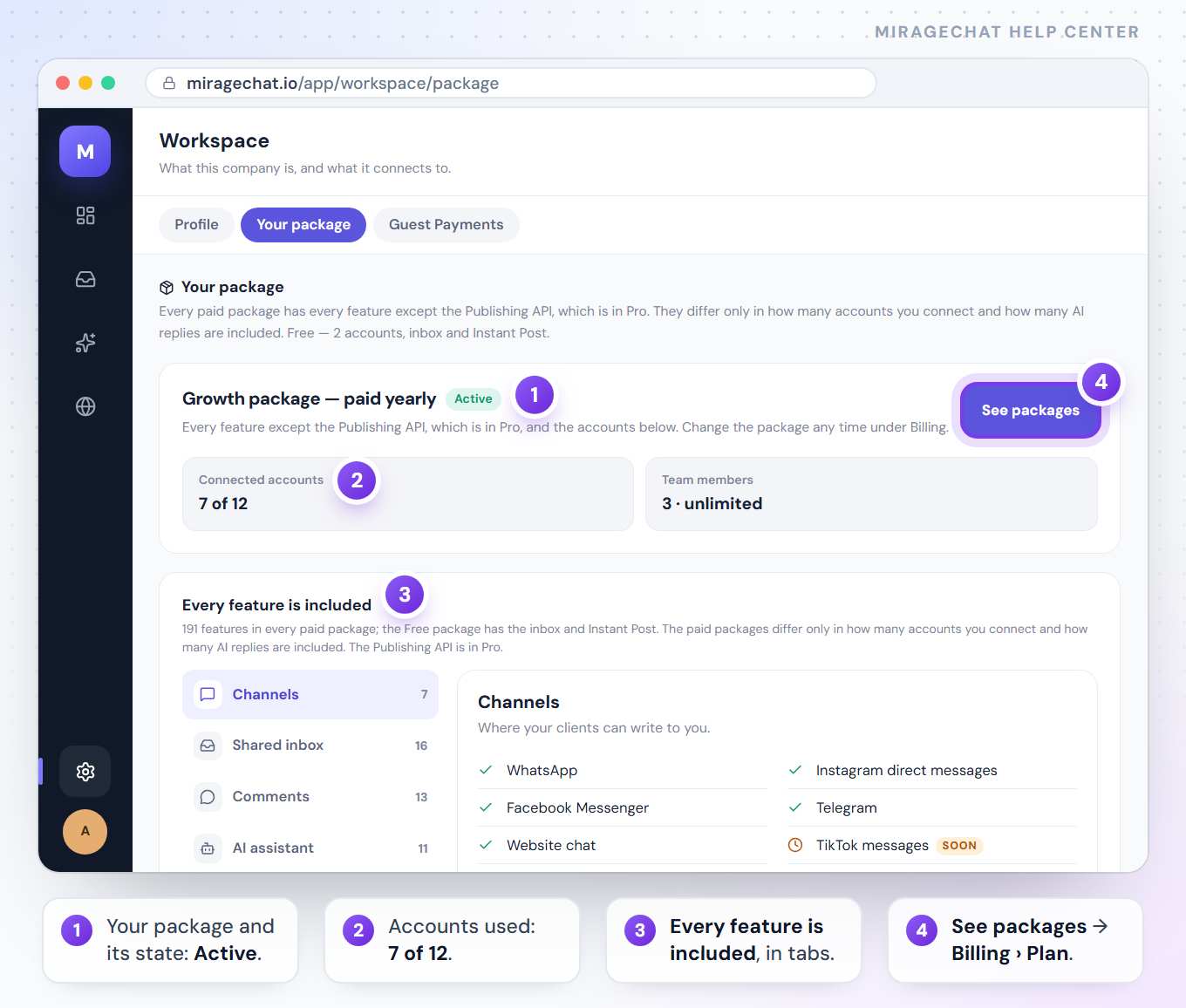
Workspace › Your package.Read the headline
The first card names your package with its state — Active, Trial, Free, Payment due, Awaiting payment or On hold — and a line on what that means, for example “Growth package — paid yearly”.
Check what you use
Connected accounts shows used against included, such as
7 of 12. Team members shows how many people you have. On Free, Instant Post this month counts your posts out of 30.See every feature
Scroll to Every feature is included — the full list, grouped in tabs. On Free the card is called Every feature of the paid packages, so you can see what a paid package adds.
2. Change your package
Press See packages
On the package card, press See packages. It opens
Billing › Plan.Choose a package
Press the button on the package you want. Before anything happens, the card says what the change costs today and when it starts.
Confirm it
Press the button on that card again to confirm. A bigger package opens at once; a smaller one, or Free, starts on your renewal day. Nothing you connected or set up is changed by choosing.
Every case, with what it costs: Billing, plans and invoices.
3. When you reach a limit
- Starter and Growth stop at their number. Connecting one more shows “Your package includes 5 connected accounts” (or 12), the bigger packages beside it, and See packages.
- Pro never refuses. An account past its 25 connects, and the screen first says it adds $1.75 a month from your next renewal.
- Free holds 2 accounts, 1 team member and 30 Instant Posts a month. The next one shows the same card.
- After a move to a smaller package, what you have keeps working, but nothing more can be added until you remove some or change the package.
- A feature your package doesn’t include stays in the menu with a small chip naming the package that has it.
Good to know
- The free trial has every feature and up to 5 connected accounts for 14 days. When it ends without a package, the workspace stays on Free.
- Team members are unlimited on Starter, Growth and Pro.
- WhatsApp message charges aren’t part of any package. Meta bills them to the card on your own WhatsApp account.
If something looks wrong
“Your package could not be read just now”
The page couldn’t reach the server for a moment. Reload it, or open Billing › Plan, which shows the same package.
It says Payment due
The renewal didn’t go through because your balance didn’t cover it. Add balance under Billing to keep the package.
It says On hold
The package ended unpaid. The workspace can still be read and messages still arrive, but replies and posts are paused. Add balance under Billing and it reopens.
It says Awaiting payment
You chose a package and its first payment didn’t finish. Open Billing and press Finish payment.
Connected accounts reads “9 of 5”
You have more accounts than the package includes, usually after moving to a smaller one. They keep working; remove the extra ones, or change the package to add another.
On your phone
In the app, open Menu › Workspace and the Your package tab: your package, Connected accounts, Team members and See everything included. See packages opens Billing — in the app where Billing is in your Menu, otherwise on the web.
Ready?
Opens MirageCHAT in this tab. Sign in first if you’re not already.
Did this guide help?
Related guides
Still stuck? Write to info@miragechat.io with your workspace name. Never send passwords or codes.