In short
Security › Activity log is the sealed record of who did what: sign-ins, access given and taken away, channels connected, AI prompt edits, API keys, exports and erasures. Entries can’t be edited — only added — and one button proves none was changed.
Before you start
- You are the owner or an admin.
- A paid package.
Read the log
Open Security › Activity log
Go to
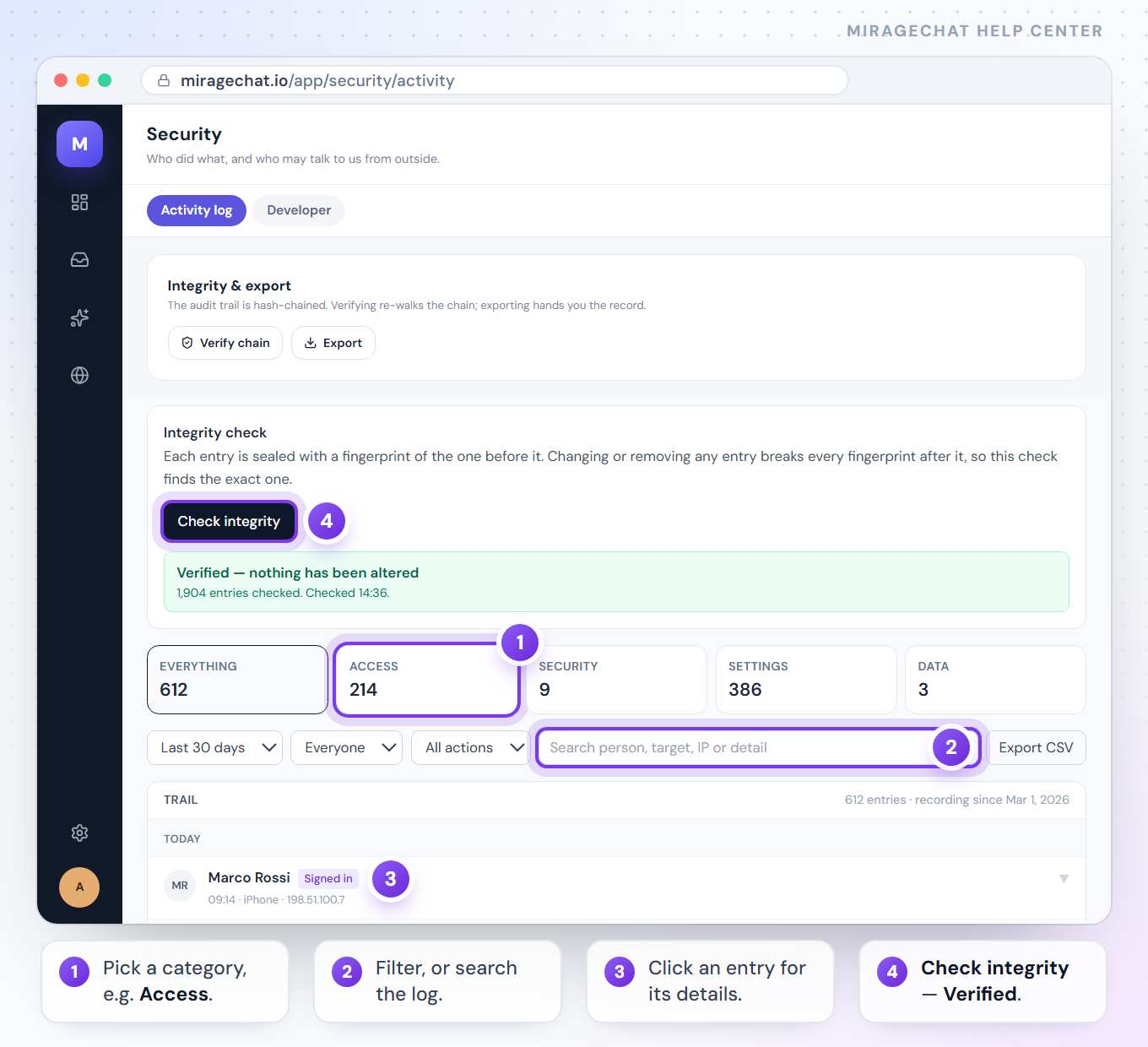
Security › Activity log. Entries are grouped by day, newest first.Pick a category
Press Everything, Access, Security, Settings or Data. Each shows its count.
Filter
Pick a period — Today to Everything — a person, or an action. Or search in Search person, target, IP or detail.
Open an entry
Click a row for the exact time, the person and their role, the action code, the target and the IP address. An AI prompt change shows the text before and after.
| Category | What it holds |
|---|---|
| Access | Sign-ins, agents created or removed, permissions given and taken away, API keys created, changed, rotated or revoked |
| Security | Password resets and anything affecting how people get in |
| Settings | Channels connected, AI prompt and knowledge edits, auto-reply rules |
| Data | Exports and erasures — every time data left or was destroyed |
Several changes by one person to the same thing within 15 minutes show as one row, such as made 4 changes — click it to open them. Sign-ins, deletions, password resets, exports and erasures always stand on their own.
Prove nothing was changed
Press Check integrity
It is at the top of the log.
Read the answer
Verified — nothing has been altered, with how many entries were checked — or Tampering detected, with the first entry that doesn’t match.
Each entry is sealed with a fingerprint of the one before it, so changing or removing any entry breaks every fingerprint after it.
Export it
Export CSV downloads the entries that match your filters, for an accountant, an auditor or your own records.
Lock the app on your phone
Open Settings in the app
In the MirageCHAT app, go to
Menu › Settings.Choose how it unlocks
Under Security, turn on Fingerprint / Face, PIN code (4 digits), or both.
Open the app
It asks each time the app starts fresh — not every time you come back to it from another app.
The app lock lives on that phone only. Change password, on the same screen, changes the password you sign in with everywhere.
Your lock PIN
A separate 6-digit PIN opens the conversations and channels you lock, on every device.
- On the web, press the lock icon next to your name at the bottom of the menu to create or change it. On the phone:
Menu › Settings, under Lock PIN. - On the phone you can open locked chats with Face ID or your fingerprint instead of typing the PIN.
- Forgot it? An owner or admin presses Reset lock PIN on your row in
Team › Agents. You create a new one the next time you lock or open a locked conversation.
Good to know
- How your team answers — replies, speed, who was online — is in Team › Performance. This log answers “who let them in” and “who changed what the AI says”.
- One person’s recent changes also show at the bottom of their Access panel in
Team › Agents. - Each entry names the device: Browser, iPhone, Android, or System for changes MirageCHAT made itself.
If something looks wrong
“This section is restricted”
The activity log is for owners and admins. Ask the owner of the workspace.
“Nothing matches these filters. Try a wider date range.”
Pick a longer period, Everyone and All actions, or clear the search.
“Tampering detected”
An entry was changed or removed directly in the database, not from inside MirageCHAT. Treat everything after it as unverified, export the log and contact MirageCHAT support.
“Wrong PIN · 2 tries left”
Type your lock PIN again carefully. After too many wrong tries, the card says when you can try again.
“Too many wrong PINs. Try again at 14:05.”
Wait until the time shown, or ask an owner or admin to reset your lock PIN.
“Only an admin can open this channel.”
An owner or admin locked that channel for admins only.
On your phone
Owners and admins open Menu › Security in the app: the same log, categories, filters and integrity check. Export CSV saves the file to the phone and offers to share it.
Ready?
Opens MirageCHAT in this tab. Sign in first if you’re not already.
Did this guide help?
Related guides
Still stuck? Write to info@miragechat.io with your workspace name. Never send passwords or codes.