In short
Coming soon. Google opens in MirageCHAT soon. Then your profile appears in Instant Post next to your other accounts. Its Google card asks for the type — Update, Event or Offer — and the button people press.
Coming soon. Google opens in MirageCHAT soon. Everything else in Instant Post works today: Post with Instant Post.
Before you start
- A Google Business Profile connected — Connect Google.
- Your text, up to 1,500 characters, and one photo if you want one.
Steps
Choose the profile
In Instant Post, tick your Google profile with the other accounts the post goes to. The Google card opens below.
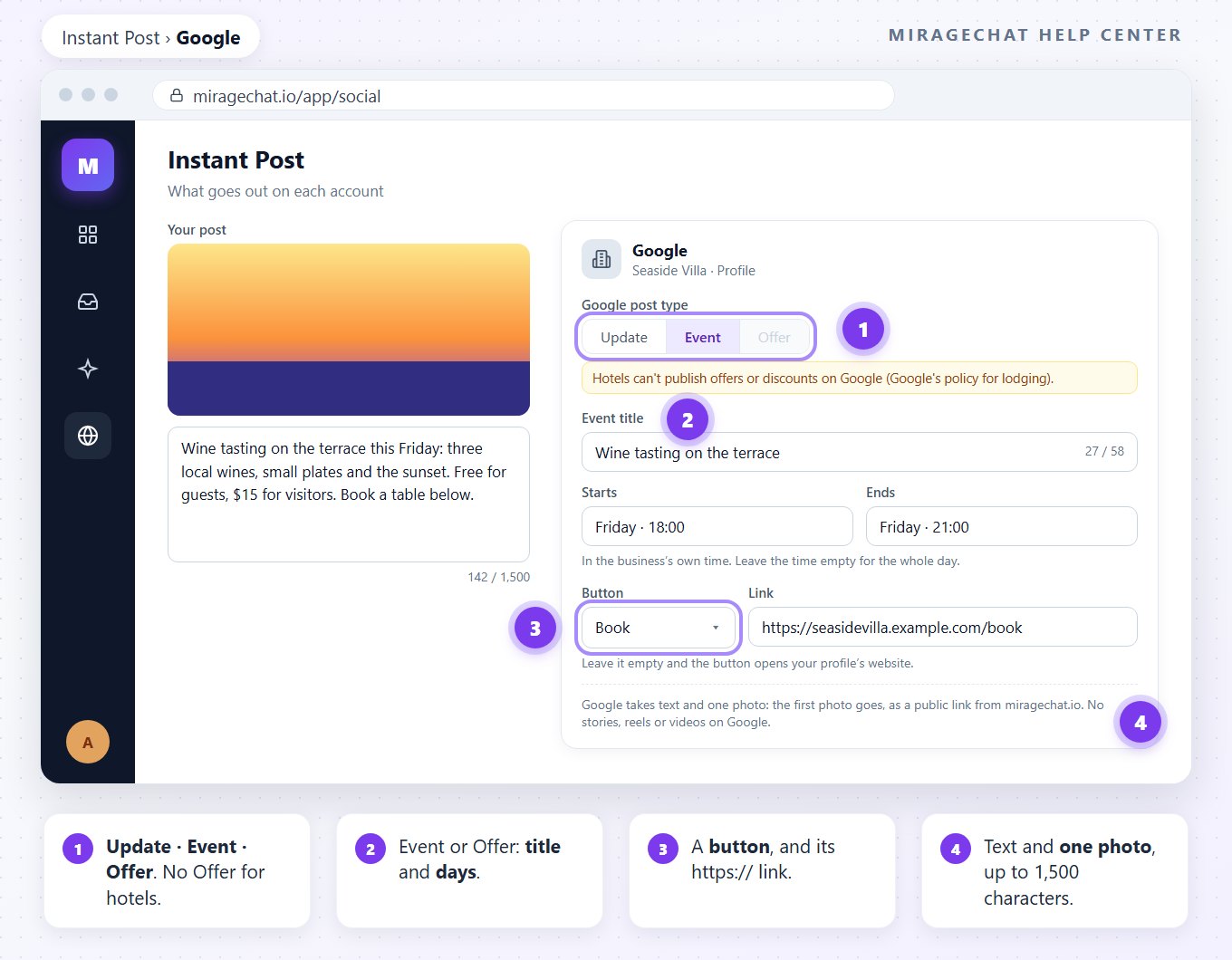
Choose the type
Update, Event or Offer. For hotels and other lodging, Offer is greyed: “Hotels can't publish offers or discounts on Google (Google's policy for lodging).”
An Event or an Offer: title and days
Give it a title, up to 58 characters, and when it starts and ends — in the business’s own time. Leave the time empty for the whole day.
Pick the button
None, Book, Order, Shop, Learn more, Sign up or Call. The link must start with https://; left empty, the button opens your profile’s website. Call dials the phone number on your Google profile.
Post
Go on as with any Instant Post: check the post and send it.
What Google takes
- Text up to 1,500 characters, with one photo or text alone.
- One photo: only the first photo of a carousel goes to Google.
- No stories, reels or videos on Google.
- An Event or an Offer needs its title and its days; Google asks for both.
If something looks wrong
When can I post to Google?
Google opens in MirageCHAT soon. Instant Post already posts to Instagram, Facebook Pages and TikTok.
Offer is grey
The profile’s main category is lodging — a hotel, a villa, an apartment. Hotels can't publish offers or discounts on Google (Google's policy for lodging). Post an Update or an Event instead.
“The button link must start with https://”
Google takes secure links only. Write the full address, starting with https://, or leave it empty to use your profile’s website.
Can I post a video to Google?
No. Google takes text and one photo; no stories, reels or videos.
Did this guide help?
Related guides
Still stuck? Write to info@miragechat.io with your workspace name. Never send passwords or codes.