In short
Text your customers from your own number. Connect a MirageTEL number — the recommended way — or your own Twilio account. Texts to that number land in your Inbox and you answer them there. The texts are billed by MirageTEL or Twilio, never by MirageCHAT.
Before you start
- An owner or admin sign-in to MirageCHAT.
- MirageTEL: your MirageTEL account — or create one on the way — and a number there. MirageTEL bills the number and the texts.
- Twilio: your Twilio account, a Twilio number that can send SMS, and its Account SID and Auth Token (Twilio Console › Account Info).
- A US number needs carrier registration (A2P 10DLC) at MirageTEL or Twilio — see below.
Connect MirageTEL (recommended)
Open Channels and press SMS
In MirageCHAT, go to
Channelsand press SMS. The window Text from your own number opens, with MirageTEL chosen.Press Connect MirageTEL
MirageTEL’s own page opens. Sign in, or create an account — MirageCHAT fills in your name, business and email.
Pick your numbers and press Allow
Tick the numbers whose texts MirageCHAT should handle, then press Allow. MirageTEL sends you straight back to Channels.
Check
Back in MirageCHAT: “SMS connected: 1 number via MirageTEL. Texts arrive in your Inbox.” Each number is a card under Channels with your MirageTEL balance and Top up at MirageTEL ↗.
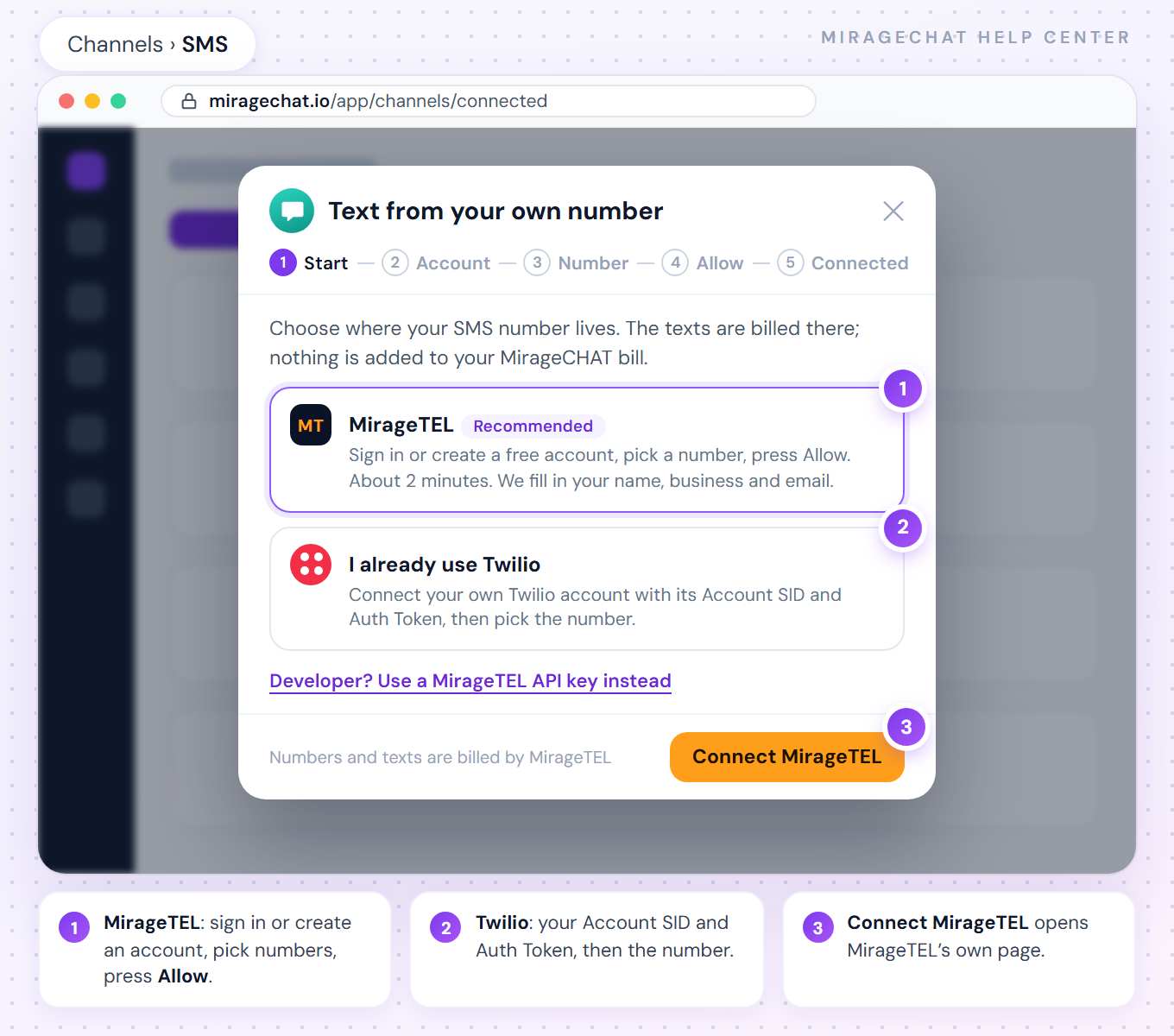
Numbers and texts are billed by MirageTEL, from your MirageTEL balance. MirageCHAT adds nothing to your bill — each SMS number is one connected account of your package.
A developer? Press Developer? Use a MirageTEL API key instead. In MirageTEL, open Developers › New key, give it access to texts and paste it; press Load my numbers, pick one and press Connect this number.
Connect your own Twilio
Choose I already use Twilio
In the same window, choose I already use Twilio and press Continue.
Paste the Account SID and Auth Token
In Twilio, open Console › Account Info and copy the two values. Paste them and press Load my numbers. MirageCHAT keeps them encrypted and uses them only for the number you pick.
Pick the number
Your Twilio numbers appear. One marked No SMS on this number can’t be chosen.
Connect this number
Press Connect this number. MirageCHAT points the number’s incoming texts to your Inbox. The texts are billed by Twilio, on your Twilio account.
Used by another app means the number’s texts go to another app today. Tick Move this number’s texts to MirageCHAT to connect it — that app stops getting them. If you disconnect the number later, MirageCHAT points its texts back.
Numbers in a Messaging Service
In Twilio a number can sit in a Messaging Service — US numbers registered for A2P 10DLC usually do. When the service is set to Send a webhook, Twilio sends the number’s texts to the service, not to the number. The list says it under the number: In Messaging Service “…” · texts go to the service, or · defers to the number.
- Defers to the number (Twilio’s Defer to sender’s webhook): the number connects like any other.
- Texts go to the service, and the service holds only this number: tick Point the Messaging Service “…” to MirageCHAT. If you disconnect the number later, MirageCHAT points the service back.
- Texts go to the service, and other numbers share it: MirageCHAT never changes a shared service. In Twilio, open
Messaging › Services › your service › Integrationand choose Defer to sender’s webhook, or move the number out of the service (a US number then leaves the service’s A2P 10DLC campaign), then connect again. - Replies still go out from the number, so its A2P 10DLC registration keeps applying.
Texting from the Inbox
- The parts counter. Under the reply box of an SMS conversation, MirageCHAT shows what the text costs before it goes — for example
57 / 70 · 1 part · Unicode (special letters or emoji). Plain text fits 160 characters in one part; a single special letter or emoji makes it 70. A longer text goes as several parts (153 or 67 characters each), and the provider bills each part. - ✓ sent · ✓✓ delivered · failed. Each reply shows what the carrier reported, as on WhatsApp.
- STOP. When someone texts STOP, MirageCHAT sends nothing more to that number. If they text START, you can write to them again.
- Text only. Pictures (MMS), voice notes and files are not sent by SMS — send a link instead.
- Answered by your team. Automations and campaigns do not send SMS; texts are answered from the Inbox.
US numbers: carrier registration (A2P 10DLC)
In the United States, carriers block or filter business texts from a local 10-digit number until the business is registered — A2P 10DLC: your brand and what you send. Register where the number lives, at MirageTEL or at Twilio; MirageCHAT does not do it for you. When you connect with a MirageTEL API key, a number still waiting shows Carriers checking, and a refused one Carriers refused.
Disconnect a number
On the number’s card under Channels, press Disconnect and confirm on the card. Its texts stop arriving here; the conversations stay. A Twilio number’s texts go back where they went before; a MirageTEL number stays yours at MirageTEL.
Questions
Does MirageCHAT charge for SMS?
No. MirageTEL or Twilio bills the numbers and the texts. In MirageCHAT, an SMS number is one connected account of your package.
Why did my text go as 2 parts?
It is longer than one part — 160 characters of plain text, or 70 once it holds a special letter or an emoji. The counter under the reply box shows it before you send.
Can I send a picture?
No. SMS is text only; send a link instead.
I don’t see the SMS button.
Connecting a number is for owners and admins. Ask one of them, or sign in with that access.
Ready?
Opens MirageCHAT in this tab. Sign in first if you’re not already.
Did this guide help?
Related guides
Still stuck? Write to info@miragechat.io with your workspace name. Never send passwords or codes.