In short
Menu › Growth has your month’s numbers, your campaigns, WhatsApp campaign, Post and Post campaign, and Your people — who live in Clients.
Before you start
- The MirageCHAT app, signed in, with access to send campaigns.
- A WhatsApp number connected, and a package that includes campaigns.
1. Your people
In Menu › Growth, the Your people card counts who said yes to offers, who was not asked and who said STOP. They live in Clients — everyone who wrote to you, and everyone you added — and Open Clients takes you there. Add the people who wrote on WhatsApp records whether they agreed to your offers. To import a file, use Customers › Import on the web.
2. A WhatsApp campaign
Start it
Press WhatsApp campaign — or + in the tab bar, then WhatsApp campaign.
Who and from where
Name the campaign, choose Who gets it — a group, one of your lists or tags, or one of your Saved audiences — and the number it goes From.
The message
Under Message, choose what to send. The Cost line shows what Meta will charge.
Test it
Under Send a test to your phone, press Test to get it yourself first.
Send
Pick the Send time — tomorrow at 10:00 is chosen for you — and press Schedule · …; with Now the button is Send now. Save draft keeps it for later.
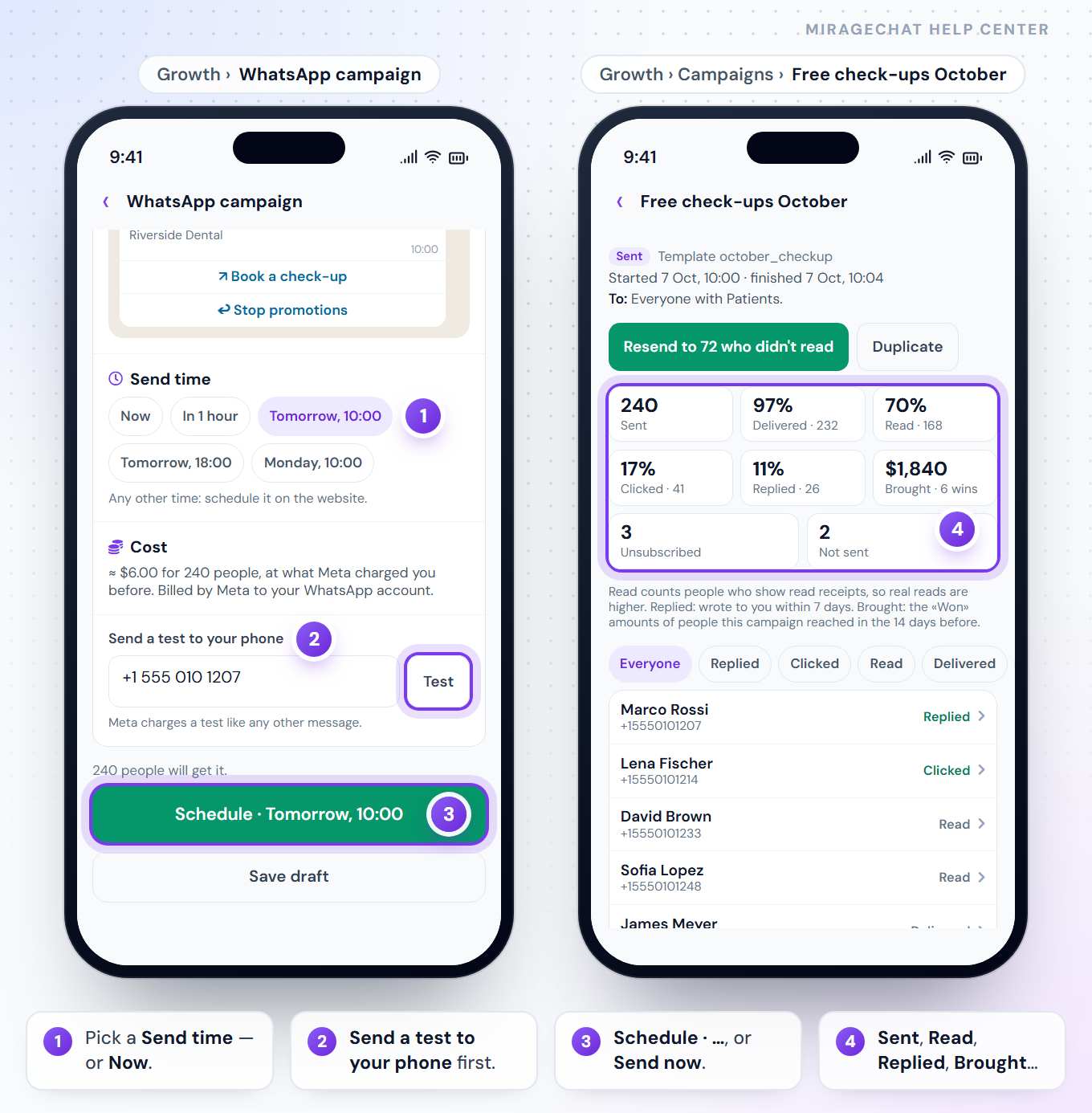
3. What it brought
Tap a campaign for its report: Sent, Delivered, Read, Clicked (when its button counts clicks), Replied, Brought, Unsubscribed and Not sent. A sent campaign offers Resend to … who didn’t read and Duplicate; one that is sending, Pause (then Resume); a scheduled one, Cancel the schedule.
4. A post campaign
Post campaign turns a post into clients: four steps, from 1 · The post to 4 · The DM, then Make it live — how it works.
Good to know
- Help at the top of Growth explains it on the phone: How it works, Set it up, Who it’s for and Rules.
- People who said STOP never get a campaign; people not asked are skipped until they say yes.
- From Clients: select people and press Campaign — they go into a list, and a new campaign opens on it.
- The same Growth as on the web — Start with Growth.
If something looks wrong
Growth isn’t in my Menu
It needs access to send campaigns. An owner or admin can change it.
Growth has a package chip
Your package doesn’t include campaigns yet. Press it to see which one does.
Ready?
Opens MirageCHAT in this tab. Sign in first if you’re not already.
Did this guide help?
Related guides
Still stuck? Write to info@miragechat.io with your workspace name. Never send passwords or codes.